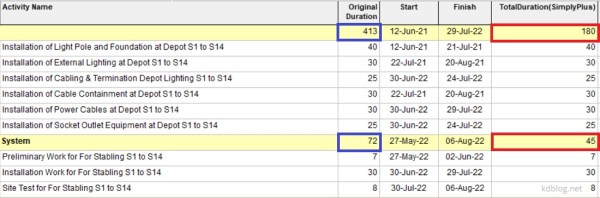
By default, Primavera P6 summarizes activity duration at the WBS (Work Breakdown Structure) level by calculating the time span from the earliest Start Date to the latest Finish Date of all activities within that WBS. However, if you prefer to calculate the summary duration by summing the individual durations of all activities, follow these steps: Step 1: Create a User Defined... Continue Reading →
What is Expected Finish Date in Primavera P6 used for?
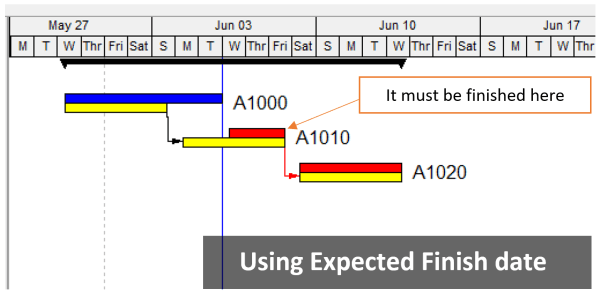
When scheduling a project in Primavera P6, you might notice that the Original Duration of an activity changes unexpectedly. This often happens when the Expected Finish Date is being used. What Is the Expected Finish Date? The Expected Finish Date acts like a constraint in Primavera P6—but only if the scheduling option “Use Expected Finish Dates” is enabled in your project settings. This... Continue Reading →
Change Hours/Day in Calendar but keep Activity Duration unchanged in Primavera P6
When scheduling in Primavera P6, you may start with an 8-hour/day calendar. If you later switch to a 10-hour/day calendar, you’ll notice that activity durations and the project completion date change. For example, a 10-day activity becomes 8 days because the total hours remain the same, but the daily work hours increase. So how can you change the calendar from 8... Continue Reading →

You must be logged in to post a comment.