When creating an activity list for a project in Primavera P6, we often add activities in a non-sequential manner. As a result, the final list of Activity IDs may not follow a clean ascending order, as shown in the example below: To organize the Activity IDs in ascending order, follow these steps: Select all activities in... Continue Reading →
How to modify Activity ID Suffix in Primavera P6
Primavera P6 provides a built-in function to renumber Activity IDs and modify prefixes. But what if you need to add a suffix instead? Here’s how you can do it using the Global Change feature. Scenario We have a simple project with default Activity IDs like this: Step 1: Open Global Change Go to Tools →... Continue Reading →
How to Trim Activity ID or Activity Name in Primavera P6
When we think about trimming data, most people export to Excel and clean it there. However, Primavera P6 provides a built-in tool to trim text directly within the application using Global Change. For example, let’s say you want to remove the first character (e.g., the letter “A”) from all Activity IDs. Here’s how: Step 1:... Continue Reading →
Renumbering Activity ID in Primavera P6
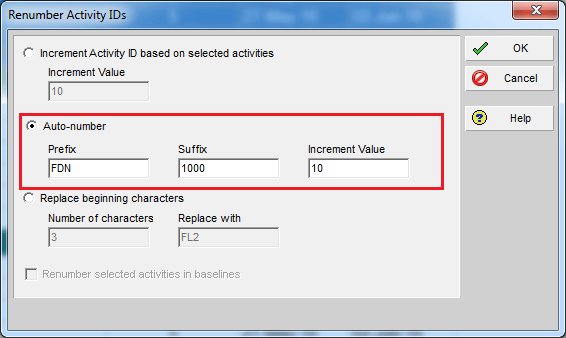
By default, Primavera P6 assigns activity IDs in a generic format like A1000, A1010, A1020, and so on. While functional, these IDs don’t provide much context. A better approach is to make IDs meaningful by including information such as the WBS they belong to. Here’s how you can do it using the Renumber Activity IDs... Continue Reading →

You must be logged in to post a comment.