Primavera P6 Professional version 21 introduces a powerful new feature that allows you to highlight different types of critical paths - making it easier than ever to analyze project schedules from multiple perspectives. Let's walk through how this feature works using a simple project example. How to View Critical Paths When you select to show... Continue Reading →
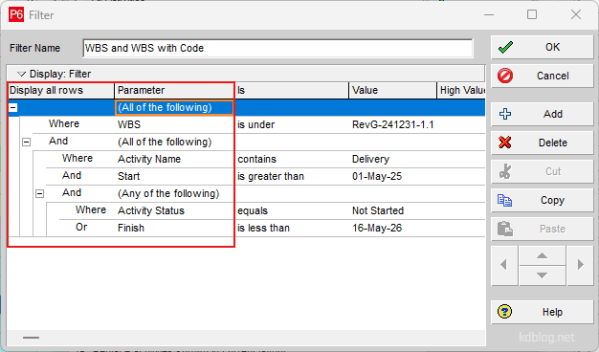
Using Nested (Multi level) Filters in Primavera P6
Nested Filters are a powerful feature for refining data by placing one filter inside another. By adding additional levels to the filter hierarchy, you can create complex, layered filters. Follow these steps to build a Nested Filter: Steps to Create a Nested Filter 1. Start with a Basic Filter Create a normal filter using “All of... Continue Reading →
Displaying multiple projects in Primavera P6
Primavera P6 allows users to view multiple projects simultaneously within the Activity window. In this example, the "Office Building" has been divided into several sub-projects, all organized under an EPS (Enterprise Project Structure) node also named "Office Building". By default, the group settings do not display the EPS title at the top of the activity... Continue Reading →
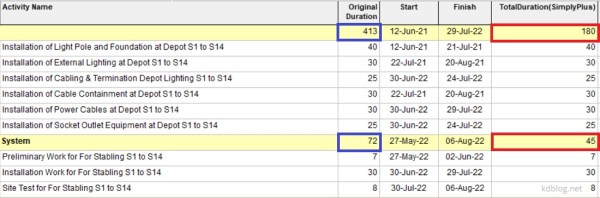
Primavera P6: Summarize/Roll up activity duration at WBS level using duration value, not earliest and latest date
By default, Primavera P6 summarizes activity duration at the WBS (Work Breakdown Structure) level by calculating the time span from the earliest Start Date to the latest Finish Date of all activities within that WBS. However, if you prefer to calculate the summary duration by summing the individual durations of all activities, follow these steps: Step 1: Create a User Defined... Continue Reading →
Summarizing overall project schedule in 1 page by Microsoft Visio Professional
Recently, I discovered a highly effective tool for creating summary schedules and graphic reports in Timeline or Bar Chart format: Microsoft Visio Professional. What makes Visio particularly appealing is that it's more affordable than tools like Office Timeline, which I had used for several years. While Office Timeline operates on a subscription model, Visio Professional can often be found at a discounted one-time price—typically... Continue Reading →
Delay Start-up Insurance to cover Anticipated Profit, Revenue in a Delayed Project
1. What is Delay Start-up Insurance (DSU)? Delay in start-up (DSU) cover is designed to secure the portion of revenue which the owner: Requires to service debt; and Realize anticipated profit. It provides protection against delays arising from physical damage caused by any type of peril included in the relevant material damage cover, i.e. the... Continue Reading →
How to remove the gap between actual bar and remaining bar in schedule update in Primavera P6
In the schedule update of Primavera P6, there are occasionally gaps (empty spaces) between the actual bars and the remaining bars as illustrated in picture below. The reasons and solutions for the issue are described in this article. Reason 1: Primavera P6 schedules and displays the activities on Gantt chart in a very detailed and... Continue Reading →
Forensic / Delay Schedule Analysis – Summary Graphic Report in 1 Page
After completing delay analysis in Primavera P6 or MS Project, it is important to prepare a concise summary graphic report tailored for high-level management. Detailed reports, such as the one shown below, can be overwhelming and make it difficult to grasp the overall impact of delays at a glance. A simplified visual—such as a bar... Continue Reading →
Benefit of using Primavera P6 in Delay Analysis
Primavera P6 is a powerful tool for conducting delay analysis in project management. It offers several features that help identify, evaluate, and present the impact of delays on project schedule. Below are some of the key benefits: 1. Identifying Activities That Impact Critical Milestones In complex projects, multiple delay events may occur, each affecting different... Continue Reading →
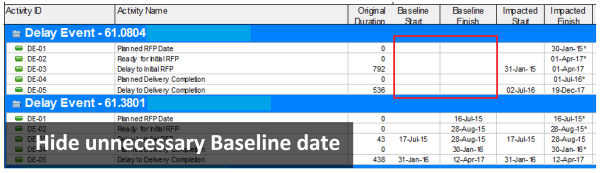
Delay Analysis report in Primavera P6: Hide Baseline dates in Delay Event project
When performing delay analysis in Primavera P6, it’s common to compare the Impacted Schedule with the Baseline Schedule. However, displaying baseline dates in the Delay Event project can be misleading and unnecessary, as they do not represent meaningful data in that context. By default, Primavera P6 displays values in the Baseline Start and Baseline Finish... Continue Reading →
Primavera P6 export to Excel. How to color WBS level automatically
When exporting the Activity Table from Primavera P6 to Excel, it can be difficult to visually distinguish between different WBS (Work Breakdown Structure) levels. In this guide, I’ll show you how to automatically color-code WBS levels in Excel, making your report easier to read—similar to how it appears in P6. Step 1: Add the WBS... Continue Reading →

You must be logged in to post a comment.