
Learn why project completion dates change after importing in Primavera P6 and how to fix it by adjusting calendar settings. Step-by-step guide included.
Why Does the Project Completion Date Change After Importing in Primavera P6?
Learn why project completion dates change after importing in Primavera P6 and how to fix it by adjusting calendar settings. Step-by-step guide included.

Primavera P6 Professional version 21 introduces a powerful new feature that allows you to highlight different types of critical paths - making it easier than ever to analyze project schedules from multiple perspectives. Let's walk through how this feature works using a simple project example. How to View Critical Paths When you select to show... Continue Reading →
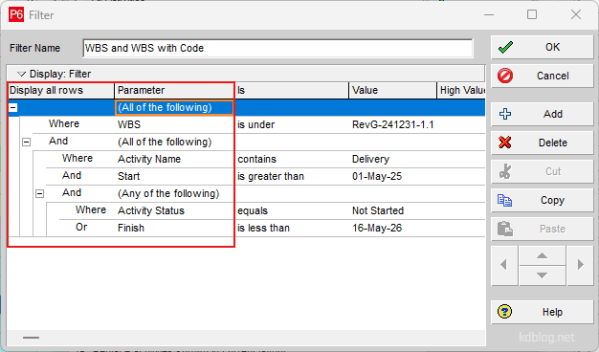
Nested Filters are a powerful feature for refining data by placing one filter inside another. By adding additional levels to the filter hierarchy, you can create complex, layered filters. Follow these steps to build a Nested Filter: Steps to Create a Nested Filter 1. Start with a Basic Filter Create a normal filter using “All of... Continue Reading →

Primavera P6 allows users to view multiple projects simultaneously within the Activity window. In this example, the "Office Building" has been divided into several sub-projects, all organized under an EPS (Enterprise Project Structure) node also named "Office Building". By default, the group settings do not display the EPS title at the top of the activity... Continue Reading →
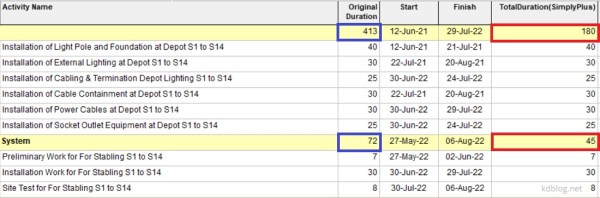
By default, Primavera P6 summarizes activity duration at the WBS (Work Breakdown Structure) level by calculating the time span from the earliest Start Date to the latest Finish Date of all activities within that WBS. However, if you prefer to calculate the summary duration by summing the individual durations of all activities, follow these steps: Step 1: Create a User Defined... Continue Reading →

Problem When attempting to change the Remaining Duration of an activity, the value reverts to its original state. Change the Remaining Duration value of an activity Causes & Solutions 1. Expected Finish Constraint If the activity has an Expected Finish constraint, the Remaining Duration is automatically calculated as the time between the Data Date and the Expected Finish date. This prevents manual updates... Continue Reading →
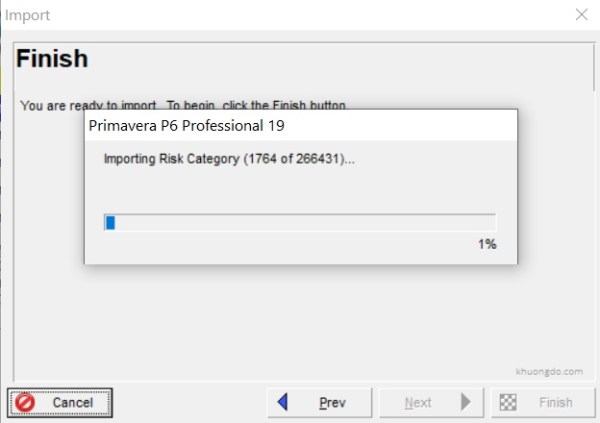
When importing an Primavera P6 XER file, P6 Professional could be very slow or hanged when it starts to import Risk Category like the picture below. Primavera P6 Import with Risk Category These Risk Category comes from a Primavera model or database that use Risk Analysis application. If we do not use this Risk Analysis... Continue Reading →
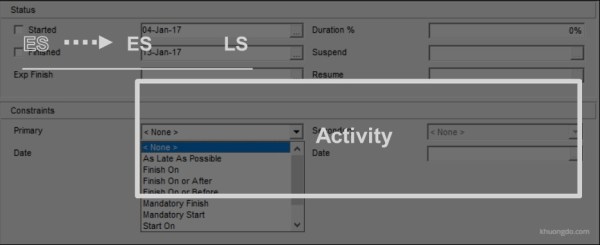
1. Purpose of Constraints in Primavera P6 Date restrictions used to reflect project requirements that cannot be built into the network logic.More accurately reflect real-world aspects of a project.Provide added control of a project.Apply to the entire project or to individual activities.Commonly used project-level constraint: Must Finish ByCommonly used activity-level constraint: Start On or AfterNo... Continue Reading →
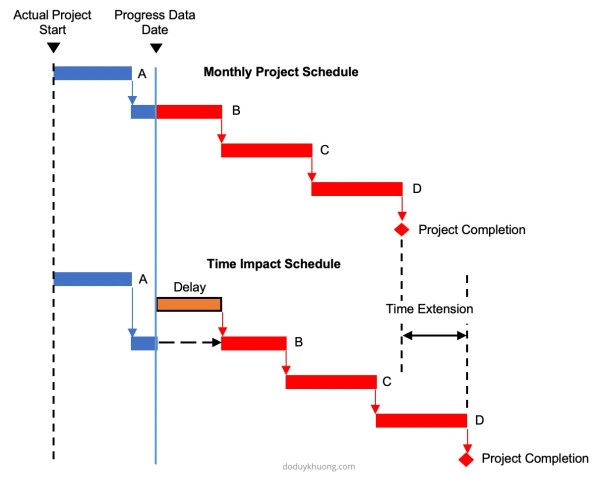
This article addresses the concepts of several typical delay analysis methods in construction claims. Why do we need Delay Analysis in Construction Claims? Because The Delay Must Affect The Critical Path The Construction Contracts often state that no adjustment to the critical milestones dates or the scheduled completion dates would be made unless the delay... Continue Reading →

The Driving Relationship is determined based on the Relationship Free Float and the business rules for Driving Relationships. Relationship Free Float Relationship Free Float (Rel FF): The Free Float on the relationship. Calculated as Successor Early Start (assuming a Finish to Start relationship) - Relationship Early Finish on the predecessors' calendar. This field is computed... Continue Reading →
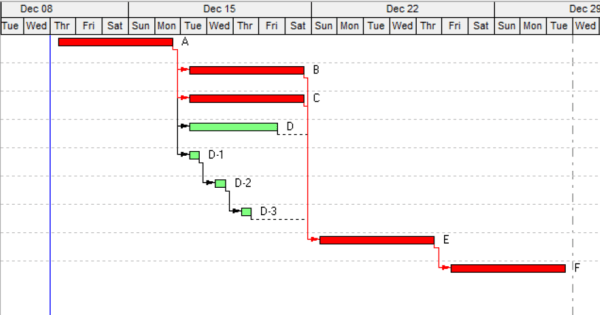
In Primavera P6, when we use "longest path" option to determine the critical path, the process to determine the longest path is as follows: The longest path activities are determined by reviewing the schedule backwards (starting from the last activity) through the driving relationships; If the relationship between two activities is driving, then both activities... Continue Reading →
Let’s celebrate by buying Khuong Do a cup of coffee :-)


 Khuong Do Blog
You must be logged in to post a comment.