
Learn why project completion dates change after importing in Primavera P6 and how to fix it by adjusting calendar settings. Step-by-step guide included.
Why Does the Project Completion Date Change After Importing in Primavera P6?
Learn why project completion dates change after importing in Primavera P6 and how to fix it by adjusting calendar settings. Step-by-step guide included.

Primavera P6 Professional version 21 introduces a powerful new feature that allows you to highlight different types of critical paths - making it easier than ever to analyze project schedules from multiple perspectives. Let's walk through how this feature works using a simple project example. How to View Critical Paths When you select to show... Continue Reading →
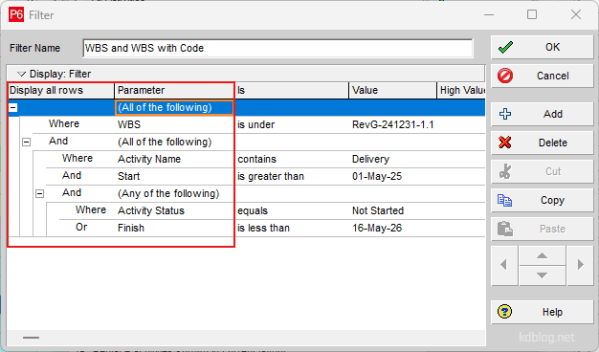
Nested Filters are a powerful feature for refining data by placing one filter inside another. By adding additional levels to the filter hierarchy, you can create complex, layered filters. Follow these steps to build a Nested Filter: Steps to Create a Nested Filter 1. Start with a Basic Filter Create a normal filter using “All of... Continue Reading →

Primavera P6 allows users to view multiple projects simultaneously within the Activity window. In this example, the "Office Building" has been divided into several sub-projects, all organized under an EPS (Enterprise Project Structure) node also named "Office Building". By default, the group settings do not display the EPS title at the top of the activity... Continue Reading →
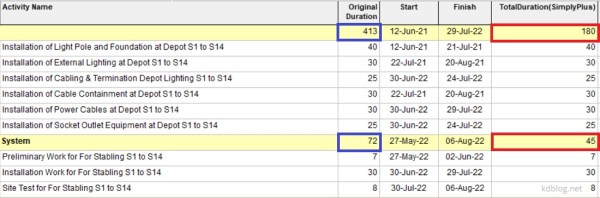
By default, Primavera P6 summarizes activity duration at the WBS (Work Breakdown Structure) level by calculating the time span from the earliest Start Date to the latest Finish Date of all activities within that WBS. However, if you prefer to calculate the summary duration by summing the individual durations of all activities, follow these steps: Step 1: Create a User Defined... Continue Reading →

Recently, I discovered a highly effective tool for creating summary schedules and graphic reports in Timeline or Bar Chart format: Microsoft Visio Professional. What makes Visio particularly appealing is that it's more affordable than tools like Office Timeline, which I had used for several years. While Office Timeline operates on a subscription model, Visio Professional can often be found at a discounted one-time price—typically... Continue Reading →

Problem When attempting to change the Remaining Duration of an activity, the value reverts to its original state. Change the Remaining Duration value of an activity Causes & Solutions 1. Expected Finish Constraint If the activity has an Expected Finish constraint, the Remaining Duration is automatically calculated as the time between the Data Date and the Expected Finish date. This prevents manual updates... Continue Reading →
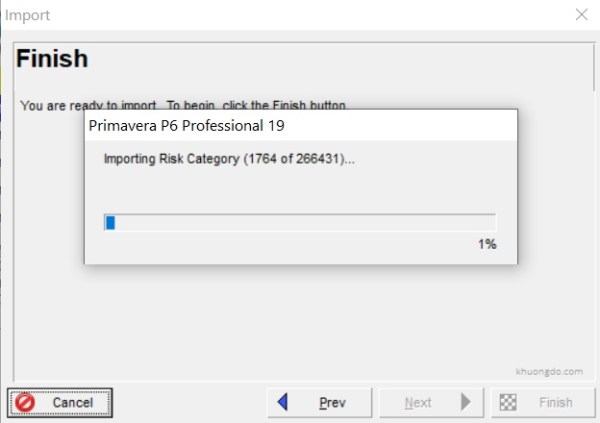
When importing an Primavera P6 XER file, P6 Professional could be very slow or hanged when it starts to import Risk Category like the picture below. Primavera P6 Import with Risk Category These Risk Category comes from a Primavera model or database that use Risk Analysis application. If we do not use this Risk Analysis... Continue Reading →
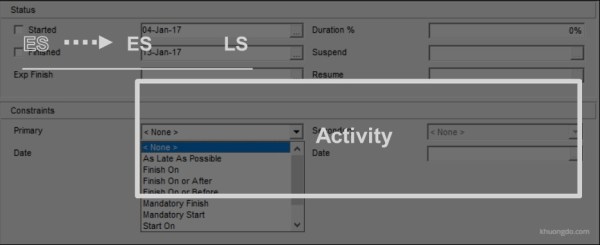
1. Purpose of Constraints in Primavera P6 Date restrictions used to reflect project requirements that cannot be built into the network logic.More accurately reflect real-world aspects of a project.Provide added control of a project.Apply to the entire project or to individual activities.Commonly used project-level constraint: Must Finish ByCommonly used activity-level constraint: Start On or AfterNo... Continue Reading →

1. What is Delay Start-up Insurance (DSU)? Delay in start-up (DSU) cover is designed to secure the portion of revenue which the owner: Requires to service debt; and Realize anticipated profit. It provides protection against delays arising from physical damage caused by any type of peril included in the relevant material damage cover, i.e. the... Continue Reading →

1. Introduction 1.1. Construction Claims What is Construction Claims? A construction claim is the assertion of a right demanding either additional time or/and payment due to the result of an action. It is possible to meet construction claims in all construction projects. Why do Construction Claims occur? Clients, contractors, and subcontractors of this environment try... Continue Reading →
Let’s celebrate by buying Khuong Do a cup of coffee :-)


 Khuong Do Blog
You must be logged in to post a comment.