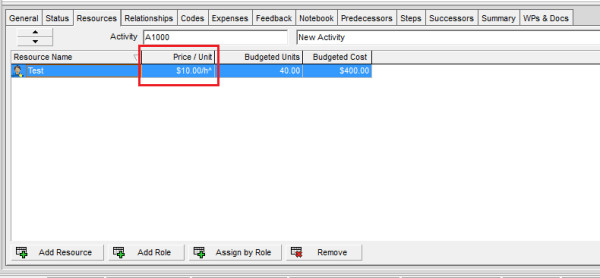
What does The Asterisk (*) Symbol next to the Resource Price/Unit in Primavera P6 mean?

In Primavera P6, you may sometimes notice an asterisk (*) next to the Price/Unit of a resource. What does this mean? Let’s break it down. Reason for the Asterisk The asterisk indicates that the resource has multiple price rates during the activity’s duration. This usually happens when: A resource’s rate changes on a specific date... Continue Reading →

Automatically update progress in Primavera: The difference between Apply Actuals and Update Progress

When you need to quickly update a project in Primavera P6 (assuming everything is going as planned), there are two options for automatically applying progress: Apply Actuals Update Progress (Progress Spotlight) Both options update activities automatically, but they work differently. Let’s explore. Apply Actuals The Apply Actuals function updates activities that have the Auto Compute... Continue Reading →

How does Retained Logic, Progress Override and Actual Dates in Scheduling Options work?

Primavera P6 provides three key options in the Scheduling Options dialog that control how the software handles Out-of-Sequence Progress: Retained Logic Progress Override Actual Dates Understanding these options is essential for accurate schedule calculations. Let’s explore how each works with an example. Primavera P6 Scheduling Options dialog What is Out-of-Sequence Progress? Out-of-sequence progress occurs when... Continue Reading →

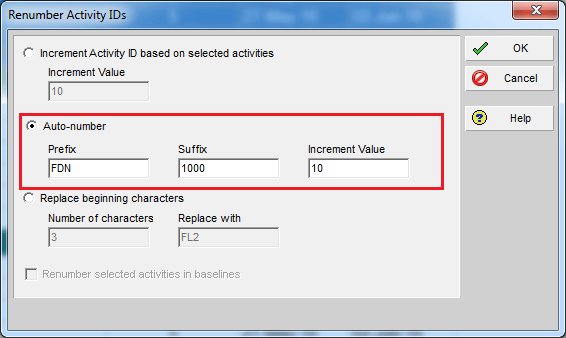
Renumbering Activity ID in Primavera P6

By default, Primavera P6 assigns activity IDs in a generic format like A1000, A1010, A1020, and so on. While functional, these IDs don’t provide much context. A better approach is to make IDs meaningful by including information such as the WBS they belong to. Here’s how you can do it using the Renumber Activity IDs... Continue Reading →

Create a website or blog at WordPress.com

Up ↑