When grouping activities by Activity Code in Primavera P6, any activities that are not fully assigned a code will appear under a summary band labeled “No <Activity Code name>”, as shown in the image below. To remove or hide these unnecessary labels, you can use a simple workaround: Create a new Activity Code value with a blank description or... Continue Reading →
Primavera P6 export to Excel. How to identify WBS level for activity
After exporting the activity table from Primavera P6 to Excel, it's very hard to identity the level of the WBS structure. The activity table without WBS level information This article describes how to identify the WBS level. The first step is to add one column to show the WBS level and enter the following formula... Continue Reading →
How to filter based on WBS date in Primavera P6
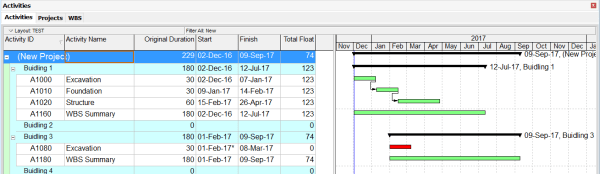
We are working on a project that includes four buildings, as shown in the image below: Our goal is to filter and identify which buildings are scheduled to start within the next three months (December, January, and February). To do this, we can create a filter based on activity dates: Primavera P6 will then display... Continue Reading →

You must be logged in to post a comment.