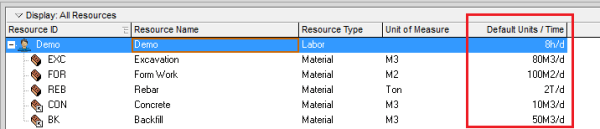
When building a schedule in Primavera P6, you can estimate activity durations based on resource productivity. Here's a step-by-step guide using a concrete example. Example Scenario A construction team can cast 10 m³ of concrete per day (this is the productivity). A foundation requires 100 m³ of concrete. Therefore, the activity duration is calculated as: Now, let’s implement this in Primavera... Continue Reading →
How Early and Late date are calculated in Start to Start relationship in Primavera P6
In a Finish-to-Start (FS) relationship, Primavera P6 calculates Early and Late dates using two main processes: 1. Forward Pass (Calculates Early Start and Early Finish) The Early Start (ES) and Early Finish (EF) of an activity are determined by the earliest possible time the activity can begin and end, based on its predecessor's finish. 2. Backward Pass... Continue Reading →
Change Hours/Day in Calendar but keep Activity Duration unchanged in Primavera P6
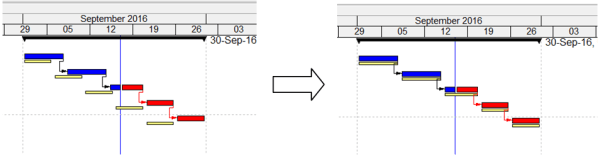
When scheduling in Primavera P6, you may start with an 8-hour/day calendar. If you later switch to a 10-hour/day calendar, you’ll notice that activity durations and the project completion date change. For example, a 10-day activity becomes 8 days because the total hours remain the same, but the daily work hours increase. So how can you change the calendar from 8... Continue Reading →
How to update Baseline in Primavera P6
In project management, a baseline is typically fixed and used to measure performance against the original plan. However, in certain cases—such as significant delays or scope changes—it may be necessary to update the baseline. This guide walks you through two methods to update a baseline in Primavera P6. We have a simple project with an assigned baseline.... Continue Reading →
How to display just One Critical path with Multiple projects open in Primavera P6
In Primavera, it's possible to work with multiple projects simultaneously. For example, we have a Program that includes two projects: Project 1 and Project 2. By default, when both projects are open, Primavera displays two separate critical paths—one for each project. However, if you want to display only one critical path for the entire program,... Continue Reading →
How to remove actual / progress from Primavera P6 schedule
Sometimes, you may have a Primavera schedule with actual progress recorded, but you need to revert it to an As-Planned state for analysis or reporting. This guide shows you how to do it step by step. Step 1: Adjust Project Calculation Settings Go to the Project window → Calculation tab. Highlight your project and... Continue Reading →
How to Level Resources / Resource Leveling without changing Project Finish date in Primavera P6
When you use Resource Leveling in Primavera P6, the software typically delays activities to avoid resource overload. However, this can push the Project Finish Date beyond its original schedule. So, how can we level resources without affecting the finish date? Let’s explore. Scenario We have a simple project: Two activities assigned to Resource A Two... Continue Reading →
How to display Multiple Critical path in Primavera P6
By default, Primavera P6 shows only one critical path when you apply the standard critical filter. However, in complex projects, you may need to display near-critical paths or multiple float paths for better analysis. This guide explains how to enable and display multiple critical paths in Primavera P6. Step 1: Open the Schedule Options Press... Continue Reading →
Why does Asterisk (*) appears next to the date in the Start or Finish column when no constraints applied to the activity
Sometimes in Primavera P6, you may notice an asterisk (*) next to the Start or Finish date of an activity, even though no constraints have been applied. What does this mean? Reason for the Asterisk The asterisk indicates that the activity has relationships to external projects. For example: You receive a project file from a... Continue Reading →
Automatically update progress in Primavera: The difference between Apply Actuals and Update Progress
When you need to quickly update a project in Primavera P6 (assuming everything is going as planned), there are two options for automatically applying progress: Apply Actuals Update Progress (Progress Spotlight) Both options update activities automatically, but they work differently. Let’s explore. Apply Actuals The Apply Actuals function updates activities that have the Auto Compute... Continue Reading →
How does Retained Logic, Progress Override and Actual Dates in Scheduling Options work?
Primavera P6 provides three key options in the Scheduling Options dialog that control how the software handles Out-of-Sequence Progress: Retained Logic Progress Override Actual Dates Understanding these options is essential for accurate schedule calculations. Let’s explore how each works with an example. Primavera P6 Scheduling Options dialog What is Out-of-Sequence Progress? Out-of-sequence progress occurs when... Continue Reading →
Critical path by Total Float is wrong in multiple calendar project
In Primavera we can define Critial activities by 2 option: There are many reasons why we should choose Longest Path instead of Total Float. One of the reason is that when our project has multiple calendar. We have 4 activities which have same calendar : Standard 5 day workweek. We use Total Float to calculate... Continue Reading →

You must be logged in to post a comment.