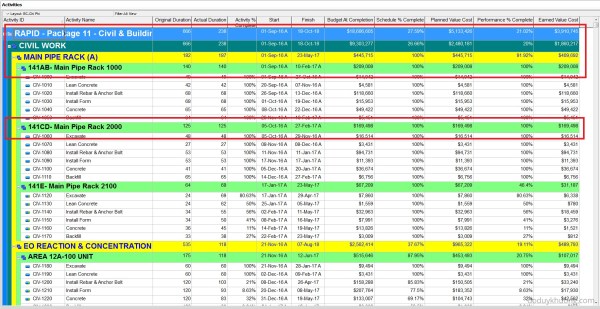
When working with layouts in Primavera P6, it's important to understand how the software calculates and displays summary information for various data types such as costs, quantities, dates, durations, float, progress, and user-defined fields (UDFs). This article explains how these summaries are derived and what factors influence them. All summary calculations in P6 are based on the currently visible... Continue Reading →
Primavera P6 Professional : “Unable to connect to the database” error
When connect SQL database in Primavera P6 Professional, we usually have problem like: Error Message: Bad public user Name or password. SQL Server Error: [DBNETLIB][ConnectionOpen(Connect()).]SQL Server does not exist or access denied. Error message: Bad public user name or password. SQL Server Error: [DBNETLIB][ConnectionOpen (Invalid Instance()).] Invalid connection.;" Error Message: Bad public user name or password. Database Server... Continue Reading →
How to Print the Legend for Stacked Histogram in Resource Usage Profile in Primavera P6
When creating a stacked histogram in Primavera P6, you may notice that the legend does not appear by default in the printed report. This can make the report difficult to interpret, especially when multiple resources are displayed. For example, in the stacked histogram view (see image below), there is no visible option to include the... Continue Reading →
What is Primavera P6 Professional latest version?
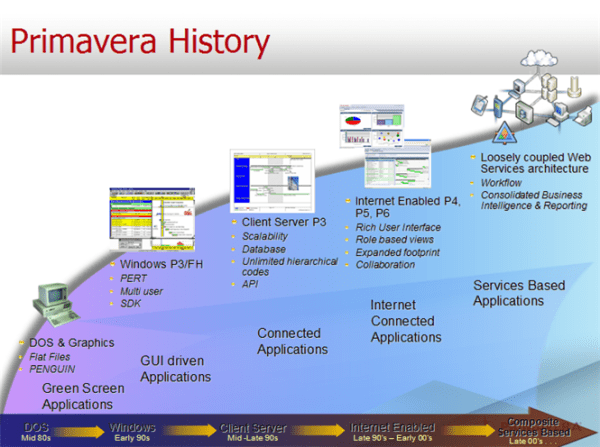
Primavera P6 Version History / Latest Version Version Release Date Detail Information 18.8 06-Aug-2018 What's new in version 18.8 P6 Professional Version 18 Documentation 17.7 21-Jul-2017 What's new in version 17.7 P6 Professional Version 17 Documentation 16.2 30-Sep-2016 What's new in version 16.2 P6 Professional 16 R2 Documentation 16.1 31-Mar-2016 What's new in version 16.1... Continue Reading →
How to define Resource Productivity in Primavera P6 and create schedule
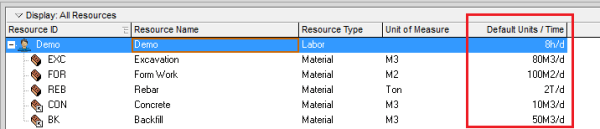
When building a schedule in Primavera P6, you can estimate activity durations based on resource productivity. Here's a step-by-step guide using a concrete example. Example Scenario A construction team can cast 10 m³ of concrete per day (this is the productivity). A foundation requires 100 m³ of concrete. Therefore, the activity duration is calculated as: Now, let’s implement this in Primavera... Continue Reading →
How to quickly identify Behind Schedule and Over Budget activity by Indicator UDF in Primavera P6
Primavera P6 allows users to efficiently track schedule and budget performance using graphical indicators in User Defined Fields (UDFs). This guide will walk you through the steps to create and use these indicators to highlight activities that are behind schedule or over budget. Identify Behind Schedule Activities Assume you have a project with a baseline... Continue Reading →
How to assign resource / resource loading / make resource plan in Primavera P6
After creating your project schedule in Primavera P6, the next step is to assign resources to activities in order to develop a comprehensive resource plan. In this guide, I’ll walk you through the process step-by-step. Step 1: Prepare Your Schedule Let’s assume you already have a schedule created, as shown in the image below: Step 2:... Continue Reading →
How to filter based on WBS date in Primavera P6
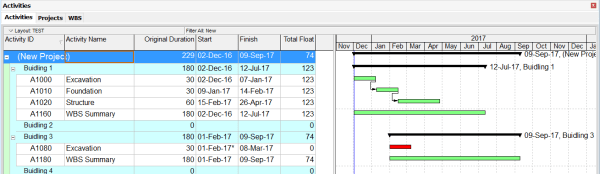
We are working on a project that includes four buildings, as shown in the image below: Our goal is to filter and identify which buildings are scheduled to start within the next three months (December, January, and February). To do this, we can create a filter based on activity dates: Primavera P6 will then display... Continue Reading →
How Early and Late date are calculated in Start to Start relationship in Primavera P6
In a Finish-to-Start (FS) relationship, Primavera P6 calculates Early and Late dates using two main processes: 1. Forward Pass (Calculates Early Start and Early Finish) The Early Start (ES) and Early Finish (EF) of an activity are determined by the earliest possible time the activity can begin and end, based on its predecessor's finish. 2. Backward Pass... Continue Reading →
Filter activity by Relationship Type in Primavera P6
Sometimes, we need to filter activities based on their relationship type. For example, you might want to display only activities with a Finish-to-Start (FS) relationship. Unfortunately, the default filter function in Primavera P6 doesn’t support this directly. But don’t worry — I’ll show you how to achieve this using the Report feature. Step-by-Step Guide Go to Tools → Reports. Click the Add button to... Continue Reading →
How is the Y-Axis scale determined in the Resource/Activity Usage Profile
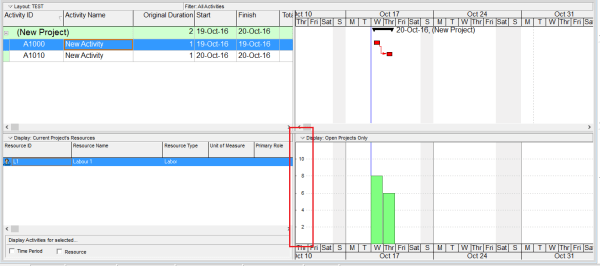
When viewing the Resource Usage Profile or Activity Usage Profile in Primavera P6, you may notice that the Y-axis scale is automatically determined by the software. But how exactly is this value calculated? Let’s break it down. The Y-axis scale depends on the Timescale setting — whether it's set to week, month, or year. Based on this setting, Primavera identifies the maximum value (i.e., the tallest... Continue Reading →
What is Cost Account in Primavera P6 used for?
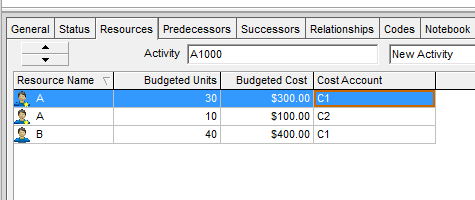
In Primavera P6, we have a feature called Cost Account. When we assign resources to an activity in Primavera P6, it generates associated costs. These costs can be grouped at the activity level—typically by WBS (Work Breakdown Structure) or Activity Codes—allowing for cost roll-ups and summaries. But what if we want to group costs at a more detailed... Continue Reading →

You must be logged in to post a comment.