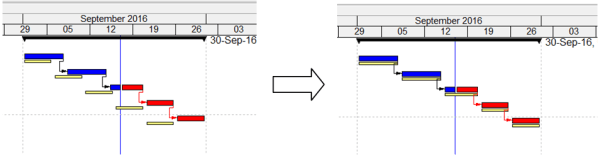
When scheduling in Primavera P6, you may start with an 8-hour/day calendar. If you later switch to a 10-hour/day calendar, you’ll notice that activity durations and the project completion date change. For example, a 10-day activity becomes 8 days because the total hours remain the same, but the daily work hours increase. So how can you change the calendar from 8... Continue Reading →
What’s new in Primavera P6 version 16.2
Download slide : whats-new-in-primavera-p6-version-16-2 New Features:
How to make a labor, equipment mobilization plan in Primavera P6
When developing a project plan, it's not enough to define only the Start and Finish dates of each activity. We also need to determine when resources are required and how many are needed at each stage. In this guide, I’ll show you how to create a Labor and Equipment Mobilization Plan using Primavera P6. Project Example We’ll use a simple project with three activities and... Continue Reading →
How to perform Impacted As-Planned Delay Analysis in Primavera P6
The Impacted As-Planned method measures the impact of the delays on the as-planned schedule. The delays are formulated as activities and added to the as-planned schedule showing the effect of each delay and demonstrating how the project is being delayed. The amount of delay equals the difference in completion dates between the schedules before and after the impacts. Step-by-Step Guide:... Continue Reading →
How to update Baseline in Primavera P6
In project management, a baseline is typically fixed and used to measure performance against the original plan. However, in certain cases—such as significant delays or scope changes—it may be necessary to update the baseline. This guide walks you through two methods to update a baseline in Primavera P6. We have a simple project with an assigned baseline.... Continue Reading →
How to display just One Critical path with Multiple projects open in Primavera P6
In Primavera, it's possible to work with multiple projects simultaneously. For example, we have a Program that includes two projects: Project 1 and Project 2. By default, when both projects are open, Primavera displays two separate critical paths—one for each project. However, if you want to display only one critical path for the entire program,... Continue Reading →
How does Progress Line in Primavera P6 work?
Primavera P6 provides a useful tool called Progress Line, which allows users to visually compare Actual Progress (% Complete) with the Baseline directly on the Gantt chart. Step-by-Step Guide 1. Project Setup We begin with a simple project that has an assigned Project Baseline. 2. Update the Project After updating the project: Activity A finishes... Continue Reading →
How Baseline Dates are calculated in Primavera P6 for Earned Value Management
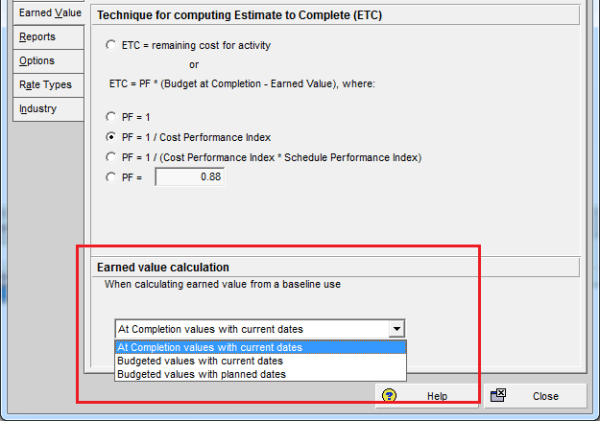
Primavera P6 provides an important option that allows users to decide whether baseline dates are based on the Planned Dates or the Current Dates of a project. This setting plays a crucial role in Earned Value Management (EVM). In this article, I’ll walk you through how this option works and how it affects schedule and... Continue Reading →
How to use Earned Value Management in Primavera P6
Primavera P6 provides a powerful technique called Earned Value Management (EVM) to monitor and control project performance. This article explains the concept of EVM and demonstrates how it works in Primavera P6 through a simple example. Example Project We have a small project to cast 10 columns: Productivity: 1 column per day Cost: $100 per... Continue Reading →
How to remove actual / progress from Primavera P6 schedule
Sometimes, you may have a Primavera schedule with actual progress recorded, but you need to revert it to an As-Planned state for analysis or reporting. This guide shows you how to do it step by step. Step 1: Adjust Project Calculation Settings Go to the Project window → Calculation tab. Highlight your project and... Continue Reading →
What is the Resource Currency selection in Primavera P6 used for?
In the Resource window under the Details tab, you’ll find a field called Currency. What does this setting do? Let’s break it down. Purpose of Resource Currency By selecting the currency in that box, it determines in which Currency the Resource will be paid with. The setting locks the Price/Unit in that Currency regardless of change in the... Continue Reading →
How does Resource Shift Calendar in Primavera P6 work?
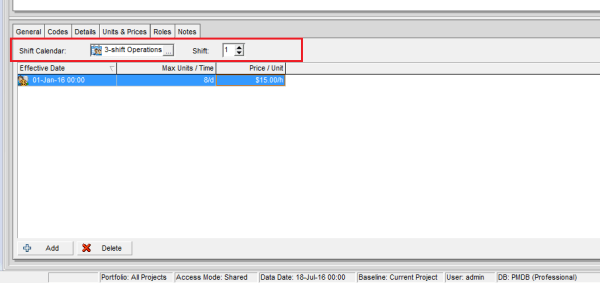
In the Resources window under the Units & Prices tab, you’ll find a field called Shift Calendar. What does it do? Let’s explore. Purpose of the Shift Calendar The Shift Calendar controls the Price/Unit for a resource based on the time an activity starts and finishes. This is useful when a resource has different rates... Continue Reading →

You must be logged in to post a comment.