Primavera P6 Professional version 21 introduces a powerful new feature that allows you to highlight different types of critical paths - making it easier than ever to analyze project schedules from multiple perspectives. Let's walk through how this feature works using a simple project example. How to View Critical Paths When you select to show... Continue Reading →
Basic Concepts and Principles of Construction Claims
1. Introduction 1.1. Construction Claims What is Construction Claims? A construction claim is the assertion of a right demanding either additional time or/and payment due to the result of an action. It is possible to meet construction claims in all construction projects. Why do Construction Claims occur? Clients, contractors, and subcontractors of this environment try... Continue Reading →
Concurrent Delay and Pacing Delay in Construction Claims
What is Concurrent Delay in Construction Claims? Meaning of concurrent delay (from SCL Delay and Disruption Protocol 2nd Edition) True concurrent delay is the occurrence of two or more delay events at the same time, one an Employer Risk Event, the other a Contractor Risk Event, and the effects of which are felt at the... Continue Reading →
Typical Delay Analysis Methods in Construction Claims
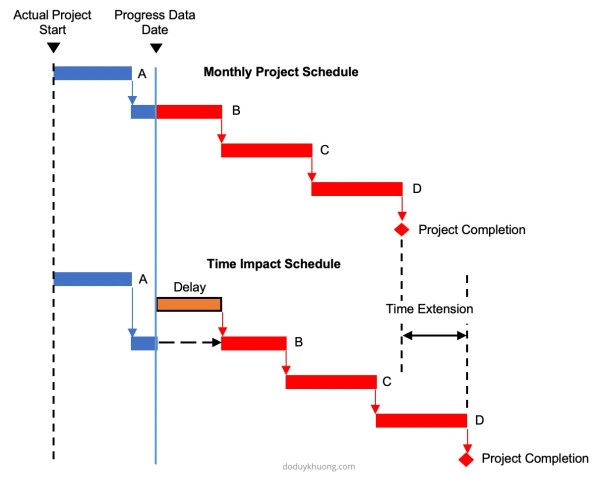
This article addresses the concepts of several typical delay analysis methods in construction claims. Why do we need Delay Analysis in Construction Claims? Because The Delay Must Affect The Critical Path The Construction Contracts often state that no adjustment to the critical milestones dates or the scheduled completion dates would be made unless the delay... Continue Reading →
How does Primavera P6 determine or identify the longest path?
In Primavera P6, when we use "longest path" option to determine the critical path, the process to determine the longest path is as follows: The longest path activities are determined by reviewing the schedule backwards (starting from the last activity) through the driving relationships; If the relationship between two activities is driving, then both activities... Continue Reading →
Benefit of using Primavera P6 in Delay Analysis
Primavera P6 is a powerful tool for conducting delay analysis in project management. It offers several features that help identify, evaluate, and present the impact of delays on project schedule. Below are some of the key benefits: 1. Identifying Activities That Impact Critical Milestones In complex projects, multiple delay events may occur, each affecting different... Continue Reading →
How to display just One Critical path with Multiple projects open in Primavera P6
In Primavera, it's possible to work with multiple projects simultaneously. For example, we have a Program that includes two projects: Project 1 and Project 2. By default, when both projects are open, Primavera displays two separate critical paths—one for each project. However, if you want to display only one critical path for the entire program,... Continue Reading →
How to display Multiple Critical path in Primavera P6
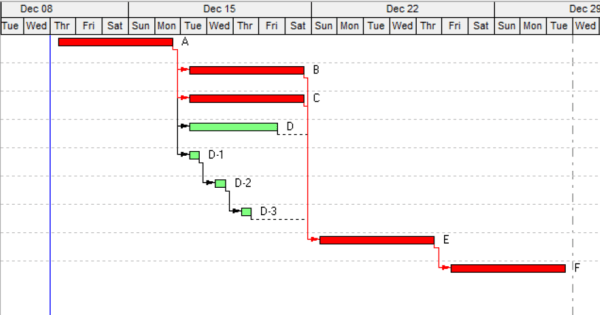
By default, Primavera P6 shows only one critical path when you apply the standard critical filter. However, in complex projects, you may need to display near-critical paths or multiple float paths for better analysis. This guide explains how to enable and display multiple critical paths in Primavera P6. Step 1: Open the Schedule Options Press... Continue Reading →
Critical path by Total Float is wrong in multiple calendar project
In Primavera we can define Critial activities by 2 option: There are many reasons why we should choose Longest Path instead of Total Float. One of the reason is that when our project has multiple calendar. We have 4 activities which have same calendar : Standard 5 day workweek. We use Total Float to calculate... Continue Reading →
Critical path: Total Float vs Longest Path
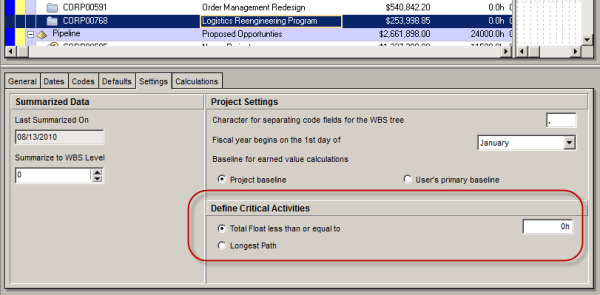
Oracle Primavera P6 offers two ways to define a critical activity in a project schedule. These are: Total Float less than or equal to [0.0h] Longest Path Which one you use depends on three things. 1. the setting you choose in the Project view’s Settings tab: 2. the setting you choose in the Schedule Options... Continue Reading →
Create critical path for “any activity”
In Primavera when we use the default "Critical" filter, it will show the critical path for the whole project (for the last activity). How about if we want to show critical path for an activity which is somewhere in middle of project, not the last one. In this case we can use "Multiple float paths"... Continue Reading →

You must be logged in to post a comment.