Tutorial Files Excel Spreadsheet (Excel 2007+): P6_Scurve_Example.xlsx – 1.5Mb Step 1 – Export Primavera P6 Resource Assignments to Excel Following the steps from our previous tutorial, you now have all the resources and assignments in an Excel sheet. You can modify the primary sheet for better graphical features. Step 2 – How to Use the Data To draw... Continue Reading →
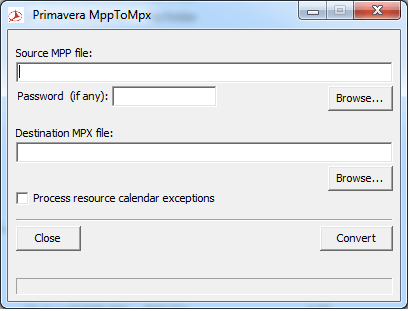
Convert Microsoft Project MPP to MPX to import to Primavera
Usually Microsoft Project saves file as MPP format. However, Primavera allows us to import Microsoft Project files in MPX format. So, here is the tool help you to convert MPP to MPX. Download from Google Drive: https://drive.google.com/file/d/0ByHnieTJNwKGdGVybE5LaElOcnM/view?usp=sharing&resourcekey=0-9JeuQrLavBI1ix781GGGRQ Download from Onedrive: https://1drv.ms/u/s!Air459YMTPJdkMEVJTjjyOf6L-1QCg?e=Xqusjj
Export data to Excel with “lowest level” summary data only
You create an Activity code to group data as you wish. After assigning and grouping activity by Activity code, here is the result: You want to export only the summary data to excel. So we will tick the "Show Summaries Only" option. However, you only want to export summary data at the lowest level. Because... Continue Reading →
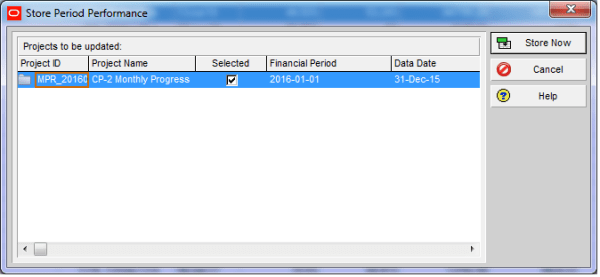
When do we use “Store Period Performance” function?
What Does Store Period Performance Do Using the Store Period Performance feature, you can track actual units and costs to date each time the schedule is updated. For example, if you increase the actual this period by 50, the Project Management module increases the Actual to Date by the same amount. At the end of... Continue Reading →
Turn off Auto Compute Actuals for 1 activity
By default our project check this option like below image so that when you update Duration % complete, P6 will update Actual units for you. When you don't want this happen, you can turn it off. However it will apply to the whole project. How about you want to turn it off for only one... Continue Reading →
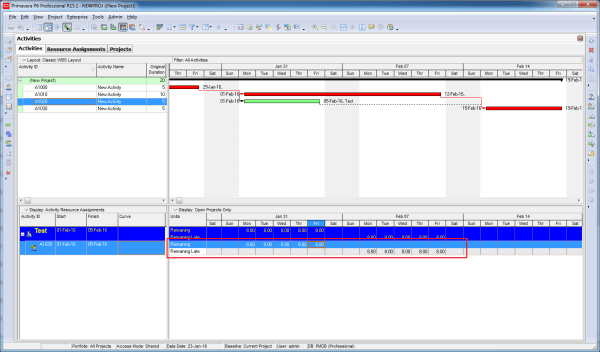
Does Resource Curve affect Remaining Late Unit
The Resource curve obviously affect Remaining Early Unit. How about Remaining Late Unit. The answer is YES. We have a resource assignment window showing Remaining Early and Remaining Late unit. When we apply resource curve. It affect both Early and Late unit.
Shortcut for moving WBS element
In WBS window, we can create a whole WBS structure by keyboard (faster than using mouse). In stead of click on the Plus icon to create a new WBS, we can press "Insert" button on keyboard. Enter the ID, press "Tab" then enter the name. We may want to move it left, instead of click... Continue Reading →
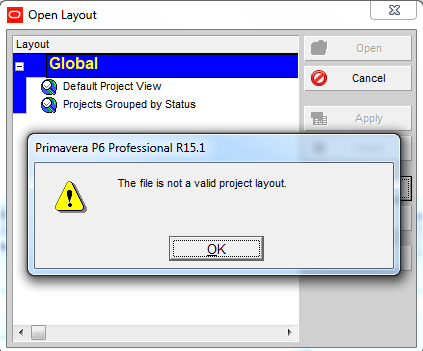
Can not import Layout
Your colleague send you Primavera XER file and Layout file. After you import project successfully, you click on Layout -> Open -> Import -> Select the layout. And this error appear: You may think "Wow, this layout file must be damaged. I need to tell him to send me again". Wait! It's not because of... Continue Reading →
Does it matter calculating the total float from the start dates or finish dates in P6?
We were taught that the total float is the amount of time that the activity can be delayed without affecting the overall project duration. And the calculation of the total float is the difference between the late dates and the early dates. Either the Late Start – Early Start or Late finish – Early Finish.... Continue Reading →
Remove relationship for multiple activities
You have a group of activities which need to be removed all relationship Instead of going to each activity and click the Remove button, you can select all activity -> right click -> Assign -> Click on either Predecessor or Successor Then select all activity and click on Remove button. Now you can see all... Continue Reading →
Can not filter on Start or Finish date
You have a very simple project. You want to show only activity which finish on 25-Jan-16. As usual, you create an filter like this: Then... SURPRISE. It's a blank screen. A big "WHY" question. To answer this question. You need to show the time of activity by going to Edit -> User Preferences -> Dates... Continue Reading →
Create critical path for “any activity”
In Primavera when we use the default "Critical" filter, it will show the critical path for the whole project (for the last activity). How about if we want to show critical path for an activity which is somewhere in middle of project, not the last one. In this case we can use "Multiple float paths"... Continue Reading →

You must be logged in to post a comment.