
In project management, a baseline is typically fixed and used to measure performance against the original plan. However, in certain cases—such as significant delays or scope changes—it may be necessary to update the baseline. This guide walks you through two methods to update a baseline in Primavera P6.
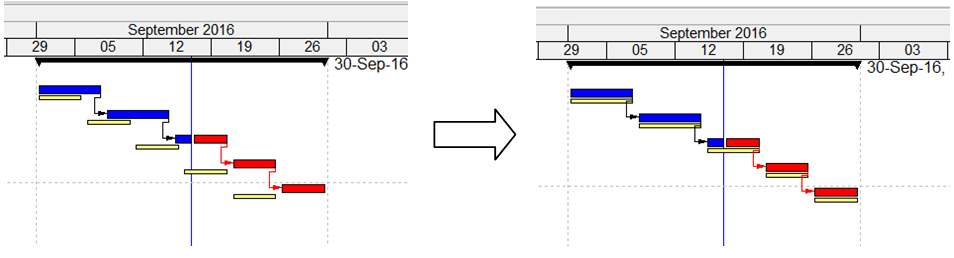
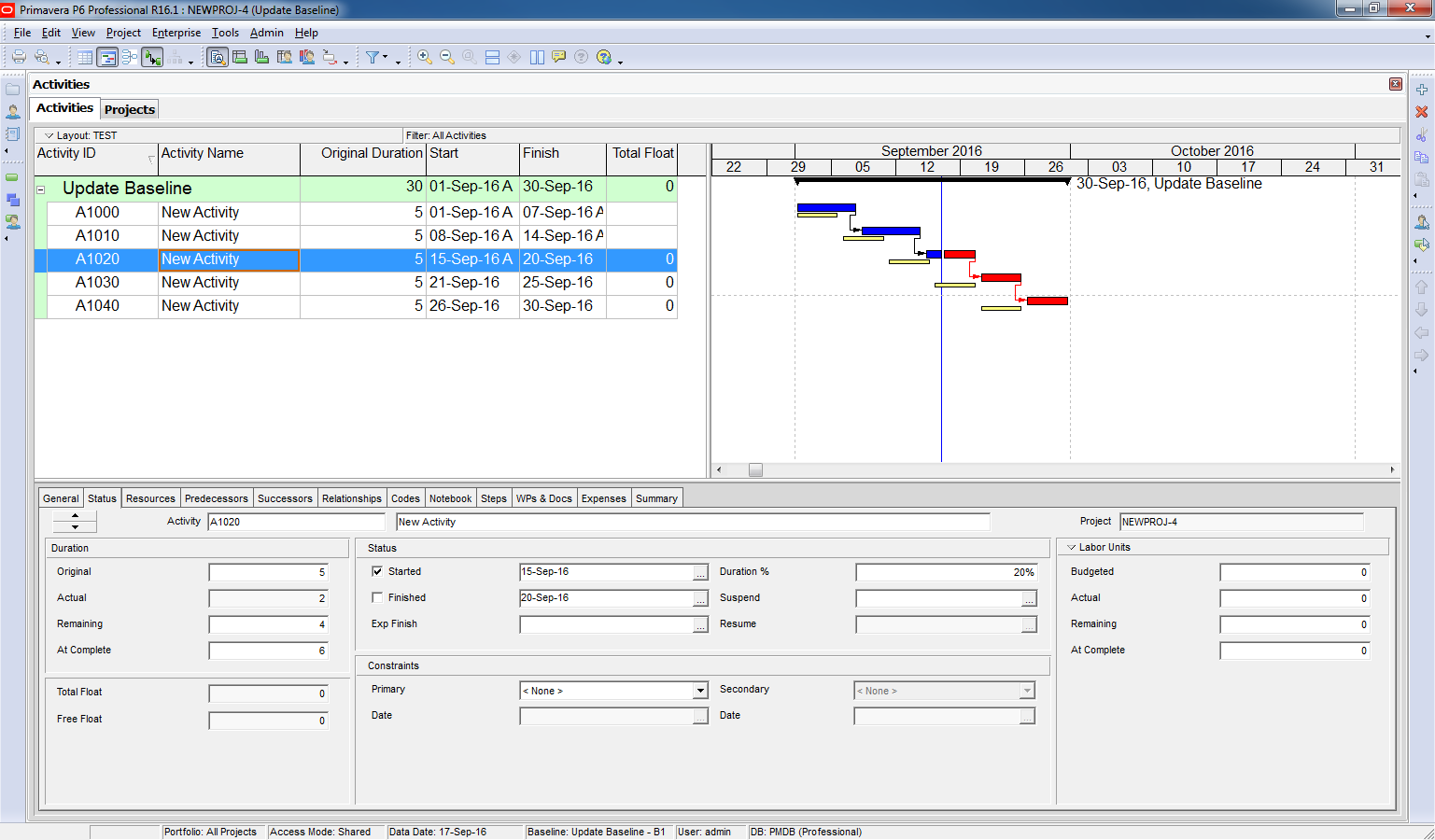
We have a simple project with an assigned baseline.
After several update periods, the project has deviated significantly from the baseline.
Following discussions with the Owner, approval is granted to update the baseline to match the current schedule.

Method 1: Create a New Baseline from the Current Schedule
Step 1: Configure Earned Value Settings
- Go to Admin > Admin Preferences
- In the Earned Value tab, select:
“At completion values with current dates”

Step 2: Create a New Baseline
- Go to Project > Maintain Baselines
- Click Add to create a new baseline from the current project

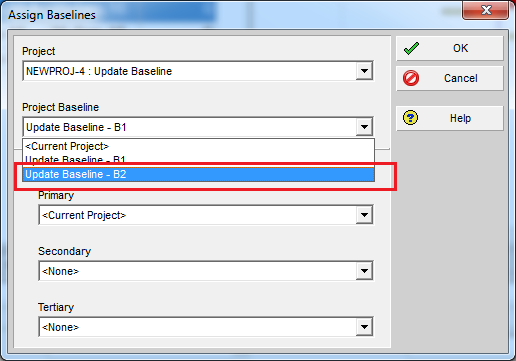
Step 3: Assign the New Baseline
- Go to Project > Assign Baselines
- Select the newly created baseline (e.g., Baseline B2)
Result
Your project now uses the updated baseline aligned with the current schedule.

Method 2: Restore and Update the Original Baseline
Step 1: Assign the Baseline as a Current Project
- Go to Project > Assign Baselines
- Select the baseline and set it as the Current Project

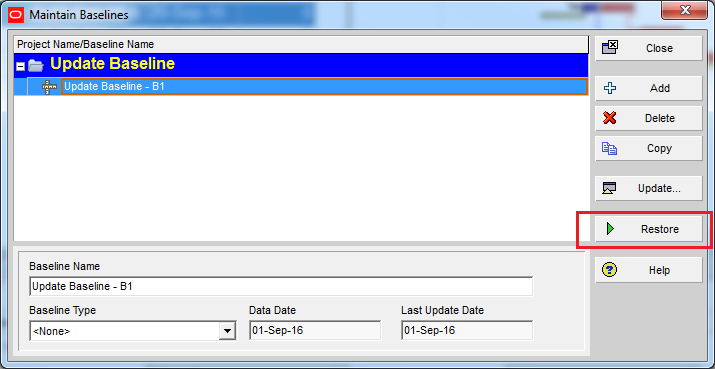
Step 2: Restore the Baseline
- Go to Project > Maintain Baselines
- Select the baseline and click Restore
Step 3: Update the Restored Project
- The baseline is now a regular project
- Open it and make the necessary updates

Step 4: Convert Back to a Baseline
- Open your main project
- Go to Project > Maintain Baselines
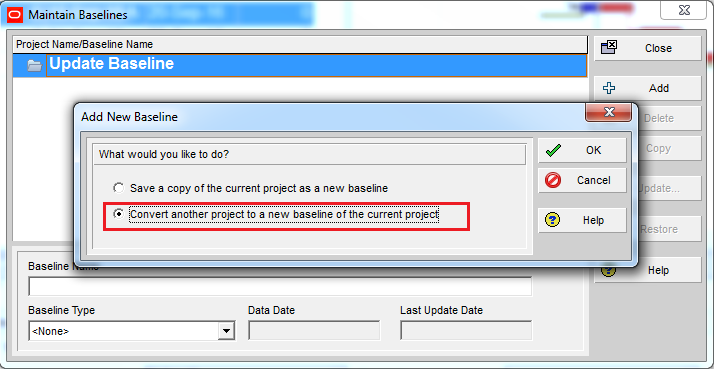
- Click Add, then choose:
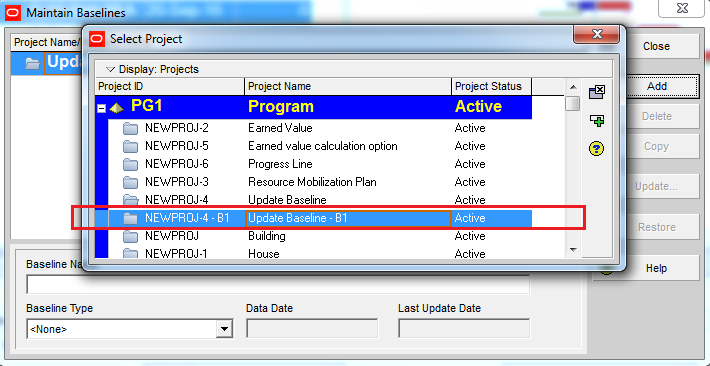
“Convert another project to a baseline” - Select the updated project
Result
Your project now has a new baseline reflecting the updated schedule.

 Khuong Do Blog
You missed out on the update baseline option where there a detailed list of options of which fields to update are presented.
LikeLike
Hi Jorge,
Thanks for your comment.
You’re right. In Maintain Baseline window we have a “Update” button which is used to update baseline, but it’s quite hard to use so I decide not to mention it.
LikeLike
Hi,
I was wondering if you add activities in baseline with new relations and resources, would it be shown in ( by converting baseline) main project?
LikeLike
Hi Mary,
By converting project to baseline, I don’t think it can show the new activity.
With option “create from current project”, it’s possible.
LikeLike
Go to menu Admin -> Admin Preferences.
In Earned Value tab, select “At completion values with current dates”
Why it’s done only in case of OPTION 1 & not in OPTION 2?
LikeLike
Update – icon is not available in Maintain Baseline window
LikeLike
what about update button option in 16.1 or 2??
we cannot find it
LikeLike
Great article, thanks!
LikeLike
Hi Sir,
Great article
Sir, I am just a beginner in the planning field.I have an issue regarding my EOT which has been approved by the consultant of 79 days.
I want your help how to introduce in my baseline schedule.
I have introduced columns in my baseline schedule layout like.
a).Original duration
b).BL1 Planned Start
c).BL1 Planned Finish
e).Start
f).Finish
g).Total float
My baseline schedule key summary points are as follow.
1).BL1 planned finish date is (30-dec-2018)
2).The total Float value is (-95 days).
3).Forcast finish date is (4-apr-2019)
I have tried so many times to introduce my EOT of (79) days in my baseline schedule by the method as fallow.
My project must finish date is = 30-dec-2018
Must finish date+EOT(79)= 20-march-2019
I introduce my new must finish date in baseline schedule & run the programme, its change only the total float value but my no effect on forecast finish date/finish of the schedule.
please help me out how to change the forecast finish date of my baseline schedule after introducing the EOT.
Regards,
Abubakar
LikeLike
Hi Abubakar.
I’m sorry that I can not support individually.
It will take lots of time for communication to identify issue and provide solution.
Maybe in future I will provide that support service with a small fee.
For now you can post question on this page : https://www.linkedin.com/groups/153246
There are lots of expert who can answer it.
Regards
Khuong
LikeLike
Hi sir,
I am a new practicing planning engineer I just want to ask regarding this situation. The completion date of our project was last June 2017, then I want to have recovery plan which is I want to revise/change the finish date from June 2017 t0 December 2017. How will I going to do it? I am also updating the progress on July 2017.
LikeLike
Hi there.
I’m sorry that I can not support individually.
It will take lots of time for communication to identify issue and provide solution.
Maybe in future I will provide that support service with a small fee.
For now you can post question on this page : https://www.linkedin.com/groups/153246
There are lots of expert who can answer it.
Regards
Khuong
LikeLike
For the activities in progress the program does not replace the base line B1 even being a copy of it itself, why?
LikeLike
Hi,
Did you do the following step before update baseline?:
Go to menu Admin -> Admin Preferences.
In Earned Value tab, select “At completion values with current dates”
LikeLike