

When building a schedule in Primavera P6, you can estimate activity durations based on resource productivity. Here’s a step-by-step guide using a concrete example.
Example Scenario
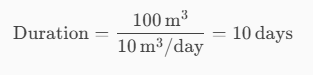
- A construction team can cast 10 m³ of concrete per day (this is the productivity).
- A foundation requires 100 m³ of concrete.
- Therefore, the activity duration is calculated as:
Now, let’s implement this in Primavera P6 using an example project illustrated in the picture below:

Step-by-Step Instructions
1. Set Duration Type
- Open your project.
- Change the Duration Type of all relevant activities to “Fixed Units/Time”.
This ensures that duration is calculated based on resource productivity.

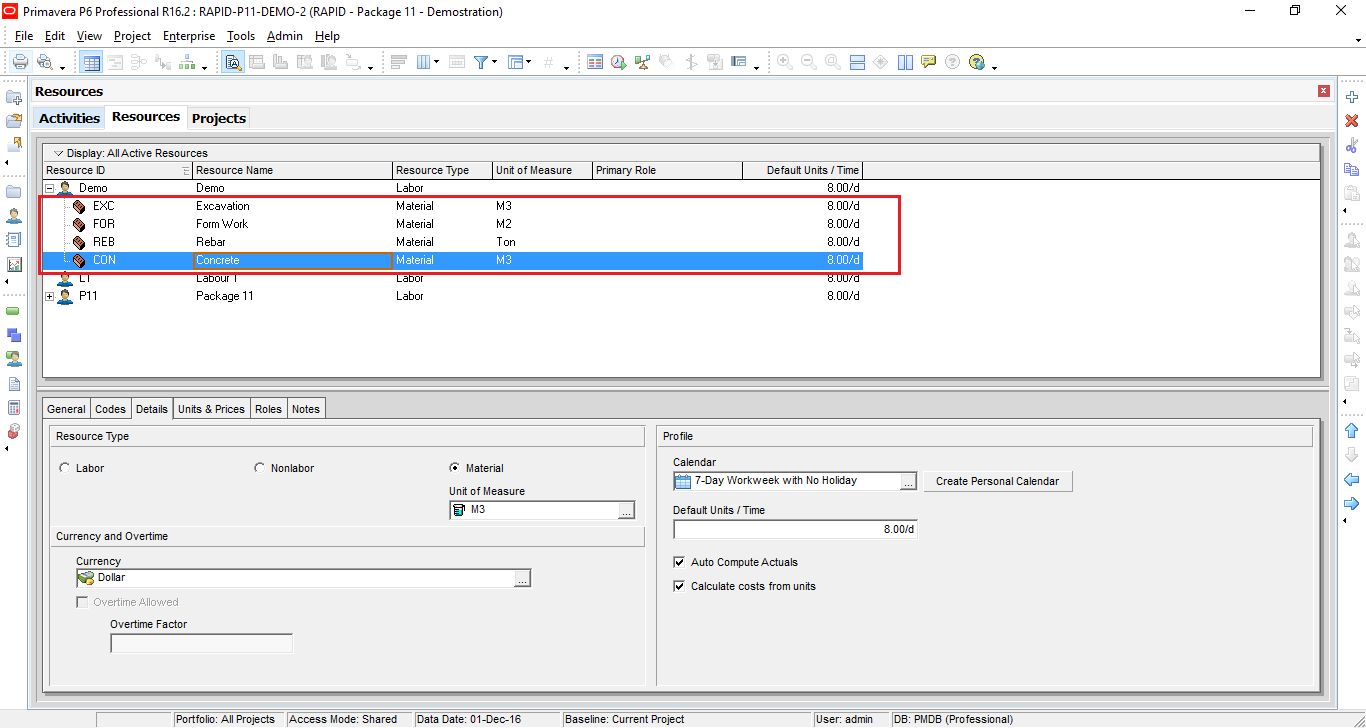
2. Create a Resource
- Go to Enterprise → Resources.
- Create a new resource named Concrete.
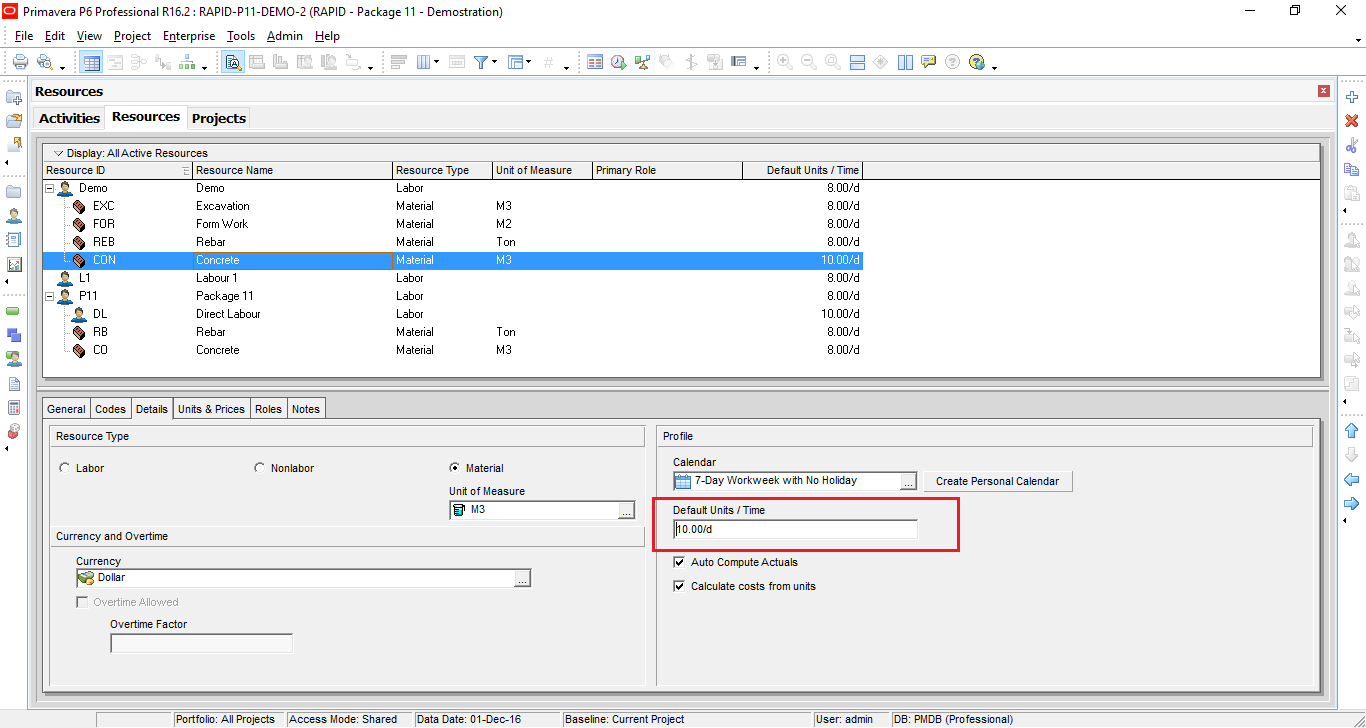
- In the Details tab, under Default Units/Time, enter 10 (representing 10 m³/day).
3. Assign the Resource
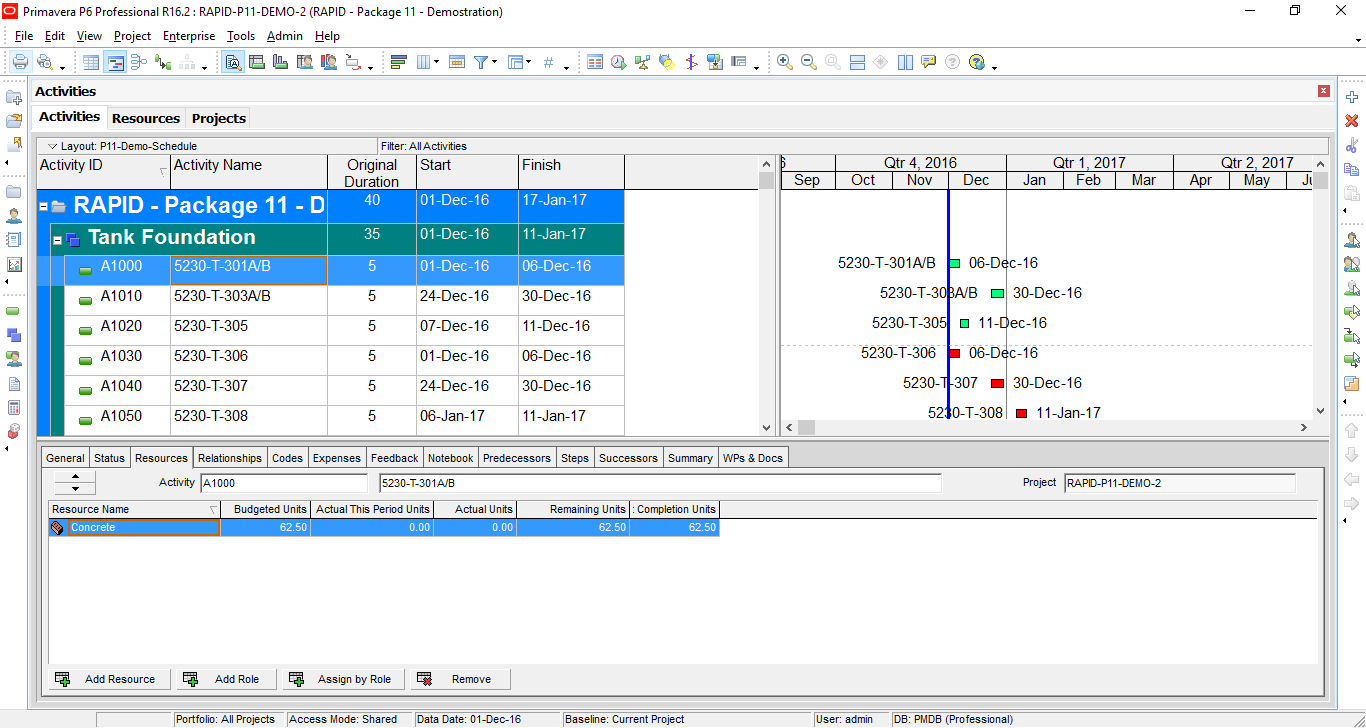
- Go to Project → Activities.
- Assign the Concrete resource to the foundation activity.

4. Set Budgeted Units
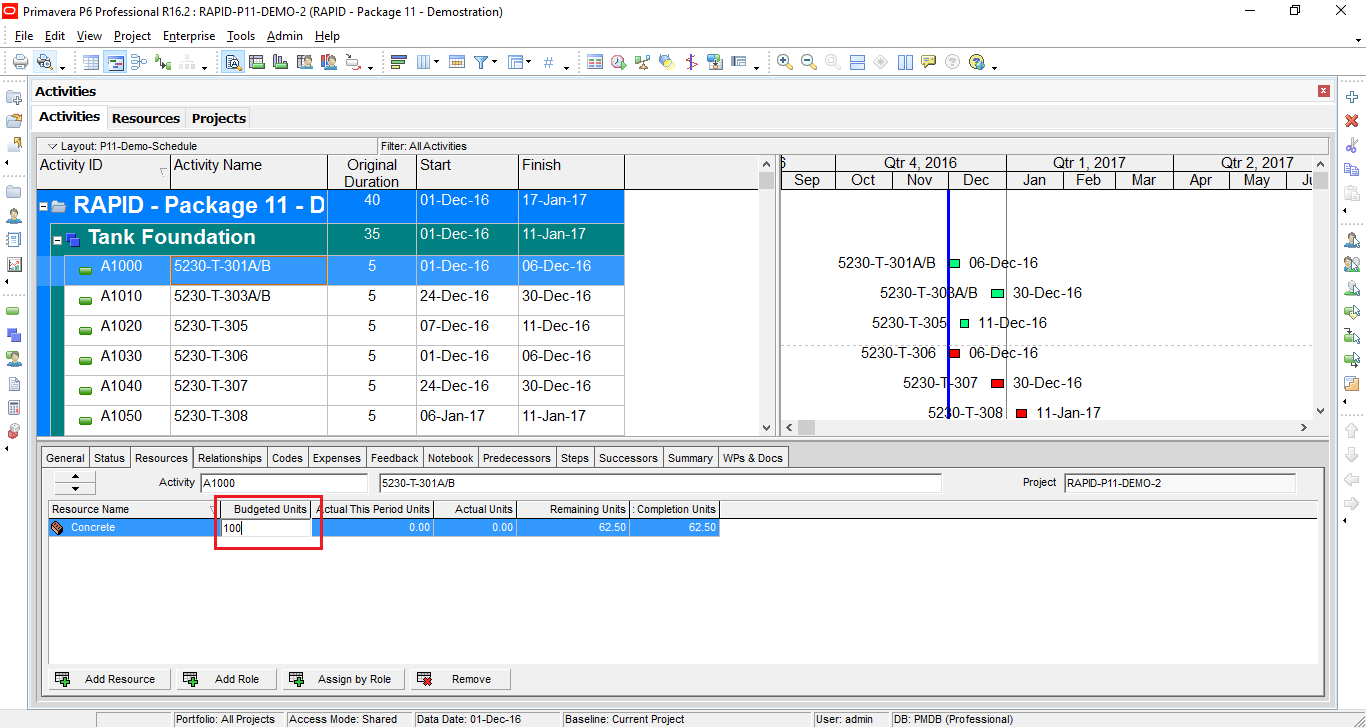
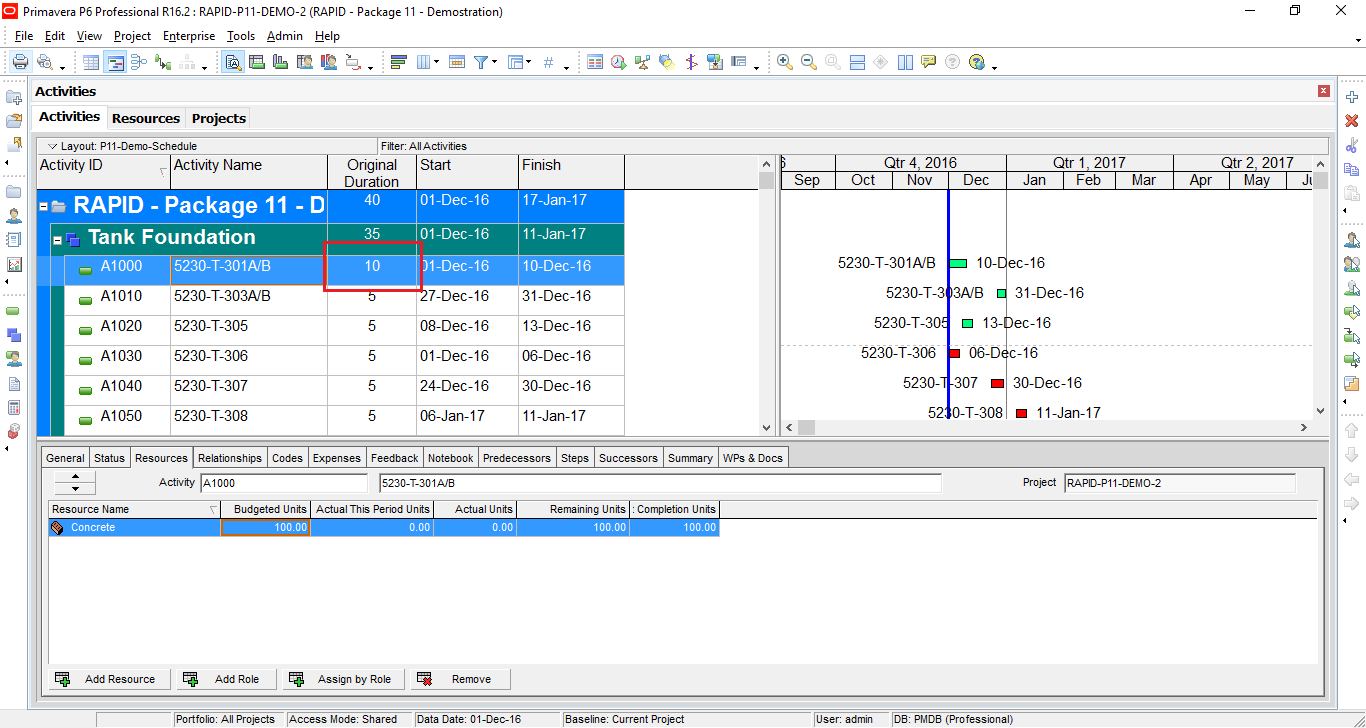
- In the activity details, set Budgeted Units to 100 (for 100 m³ of concrete).
- Primavera will automatically calculate the duration as 10 days.
5. Repeat for Other Activities
- Use the same method to define productivity and duration for other resource-driven activities.
Handling Multiple Resources
If an activity has multiple resources, the finish date will be determined by the latest finish date among them.
Example:
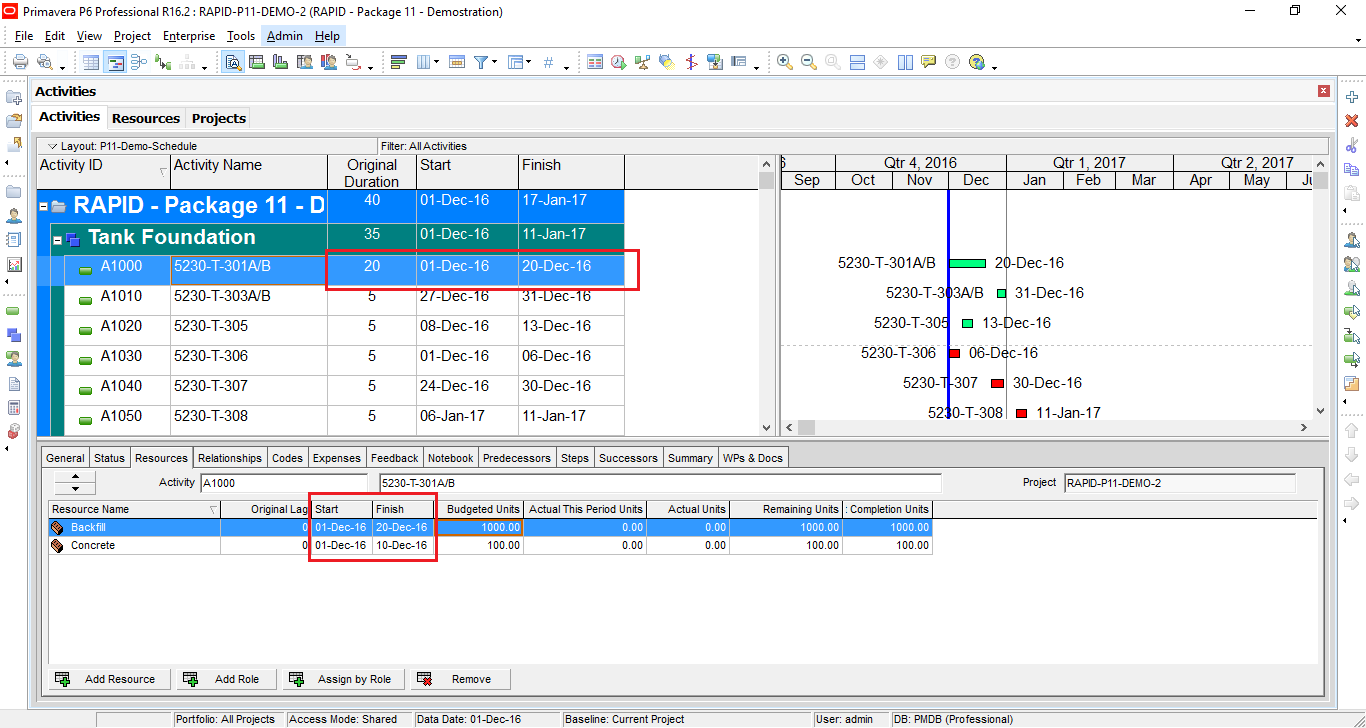
- Add another resource: Backfill.
- Set its Budgeted Units to 1000.
- If Backfill finishes on 20-Dec-16, and Concrete finishes on 10-Dec-16, the activity will finish on 20-Dec-16.

Adjusting Start Dates
- If Backfill should start after Concrete, add a lag.
- Enter 12 days in the Original Lag column.
- Backfill will now start on 13-Dec-16, creating a more realistic schedule.


 Khuong Do Blog
Hi Do Duy Khuong,
Thank you for your guidance, especially for the activities which has more than 1 resources assigned!
I have try some similar method on my previous project.. it will be more realistic if we also define “Maximum Unit/time” on each resources, to compare it with the actual maximum prodictivity on the project, and apply the resource levelling method.
If we only define the default unit/time, it may resulting an overload loading on the resources graph (which will not achievable)
LikeLike
Hi Mahisha,
Thank you for your comment.
You’re right. We should also define Maximum Unit/Time accordingly so that there will be no unrealistic resource overload.
LikeLike
Do I understand correctly that you suggest to create additional dummy resource for each type of work?
I expect that you plan to use material Concrete in your schedule and suggest to create dummy resource Conctrete 1 for foundation, Concrete 2 for walls, Concrete 3 for columns, Concrete 4 for floors, Concrete 5 for stairs, etc. It is necessary because crew productivity is different on different types of work and the crew itself is different.
It means that in real project it is necessary to create many hundreds dummy resources to be able to use your approach to modeling crew (not resource!) productivity. It does not look practical.
LikeLike
Hi.
Maybe I make a misunderstanding here by adjusting Default unit/time.
When assign resource to activity, we can adjust unit/time. So we don’t have to duplicate resource.
LikeLike
But is maximum units/time the same for different crews?
LikeLike
Yes. Maximum unit/time is the same.
For example we provide 1000 m3/day
LikeLike
You may provide 1000 m3/day on foundation, bot 100 m3/day on walls and columns, 140 m3/day on floors, etc. Different crews on different types of work have different maximum unit/time is not it?
LikeLike
You’re right. P6 can not define max unit for different type of work. In this case you need to duplicate the resource. For example: Concrete (foundation), concrete (wall)…
LikeLike
Dear Mr.Doduykhuong,
How to assign cost to an activity having multiple resources using excel in primavera?
LikeLike
sir,
can we assign two or more portfolio’s in p6
LikeLike
Hi. I still can not understand the question. Can you elaborate it?
LikeLike
I have one question, but quite not related to this article. Let say I am handling multiple contractual milestones. And each of this milestones is fixed and critical by itself, but contract requirement say any artificial schedule constraint is prohibited. I can assign lag between this milestones to have it fixed at its contractual point, but doing so will cause critical path to be inaccurate, especially if critical path is defined as longest path. Can you advice me how can I handle this without modifying activities lag? Lead and lag is quite important for me since late dates is utilized as much as early dates
LikeLike
Anh Khương cho em hỏi. Nếu công việc yêu cầu phải hoàn thành trong một khoảng thời gian nhất định với khối lượng bê tông, rebar, formwork thì có tính được số công nhân cần phải huy động để hoàn thành công việc đó không ạ. cảm ơn anh nhiều
LikeLike
Hi Toàn,
Được em. Em đã có thông số về khối lượng BT, rebar, Form (đây là Budget Unit). Có thông số thời gian (đây là Duration). P6 sẽ tính cho em Unit/Time. VD ra là 80 hour/day. Tức là em cần 10 người cho công tác này.
Lúc đó em chọn loại Duration Type là Fix Duration & Units
LikeLike
Em cảm ơn anh Khương nhiều nha 🙂
LikeLike
https://drive.google.com/open?id=0BwcxnylmmkECcVlwYWtlQk1YVmM
Anh Khương xem giúp em có đúng ko ạ. 112h/8=14 người cần huy động ạ
LikeLike
Hi thanks for your valuable information
Regards
Sasikumar
Planning Engineer
LikeLike
Great step by step instructions outlining how Earned Value Management is done in Primavera P6? [Tutorial] Do you have a similar step by step instructions on how to export/ import budgeted manhours into p6? Where you export out the p6 activities with the planned, actual and remaining budgeted hours columns, then import back in the planned and actual (earned) hours? Regards; Doug Galt. 7787720124 doug.galt@sympatico.ca
LikeLike
Hi Mr Doug,
So far I have not written an article mentioning How to export/ import budgeted manhours into P6.
Maybe there is one in future.
So please stay tuned 🙂
LikeLike
What’s your email address or contact detail?
LikeLike
Hi Eric,
You can contact me through:
Linkedin : https://vn.linkedin.com/in/khuongdo
Facebook : https://www.facebook.com/doduykhuongblog/
They are shown in bottom section of my blog.
LikeLike
Hello Mr. Khuong Do
Very good and useful article. In the above article, we arrived duration with the help of productivity and quantity. What if the duration is already given what will be the procedure to assign resources should we still take Fixed Units/ time.
LikeLike
Hi there,
In general, yes you can still use Fixed Units/Time. Because you already had duration, you will enter duration value to activity.
LikeLike
Good Morning Sir ,
if we want to use Manhours : h/m3( productivity of the actvity crew) X Q(m3)
how to that with Primavera P6 please ?
LikeLike
I have an activity that shifted to the wintertime due to late access by the owner. In the wintertime, the productivity will be less, and I need more resources to finish the work on the same activity duration. How can I model this in Primavera P6?
LikeLike