
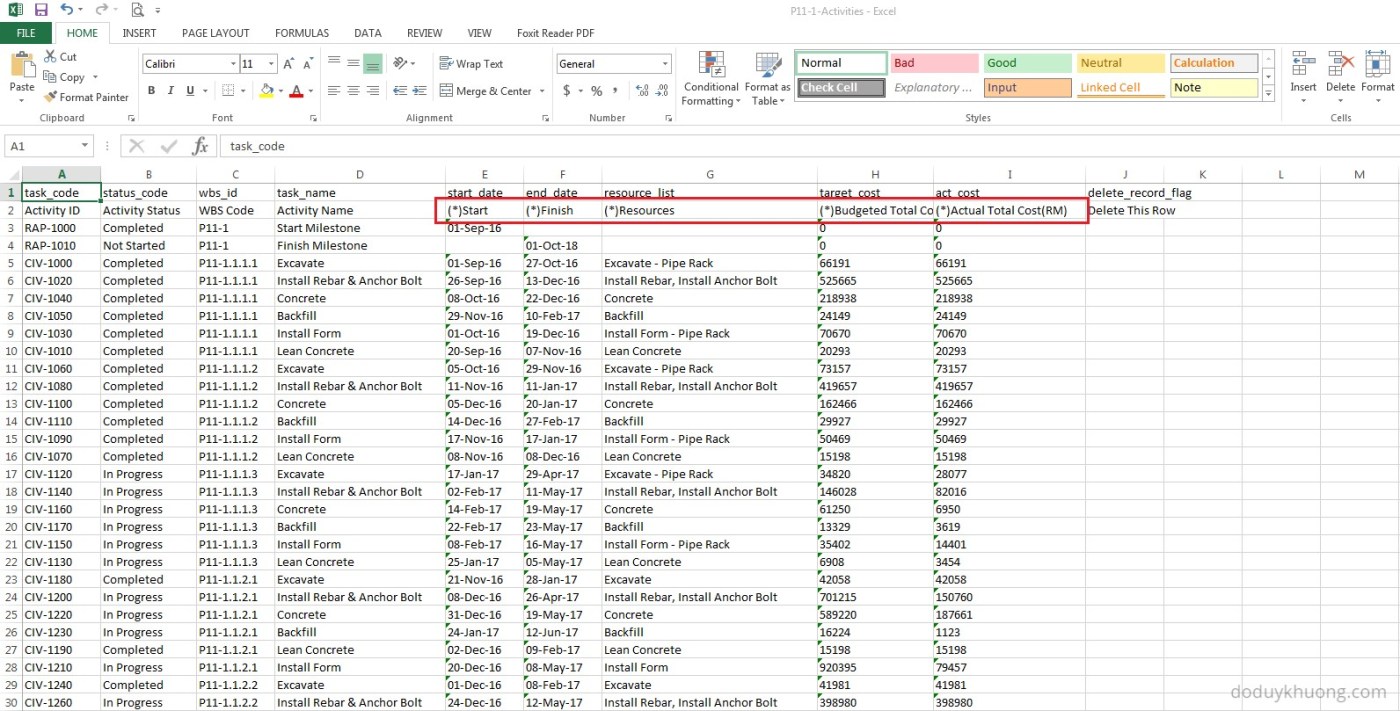
When you export data from Primavera P6 to Excel, you may notice that some column headers include an asterisk (*). What does this mean?
Columns marked with an asterisk (*) in the exported Excel file indicate non-importable fields. This means:
- You cannot modify these fields in Excel and import them back into Primavera P6.
- These fields are typically calculated or rolled-up values, which P6 generates based on other data.
Example: Budgeted Labor Units
Let’s take the Budgeted Labor Units column as an example. Although this field appears in the Activity View and can be exported to Excel, it is actually a rolled-up total of the labor units assigned to each resource on the activity.
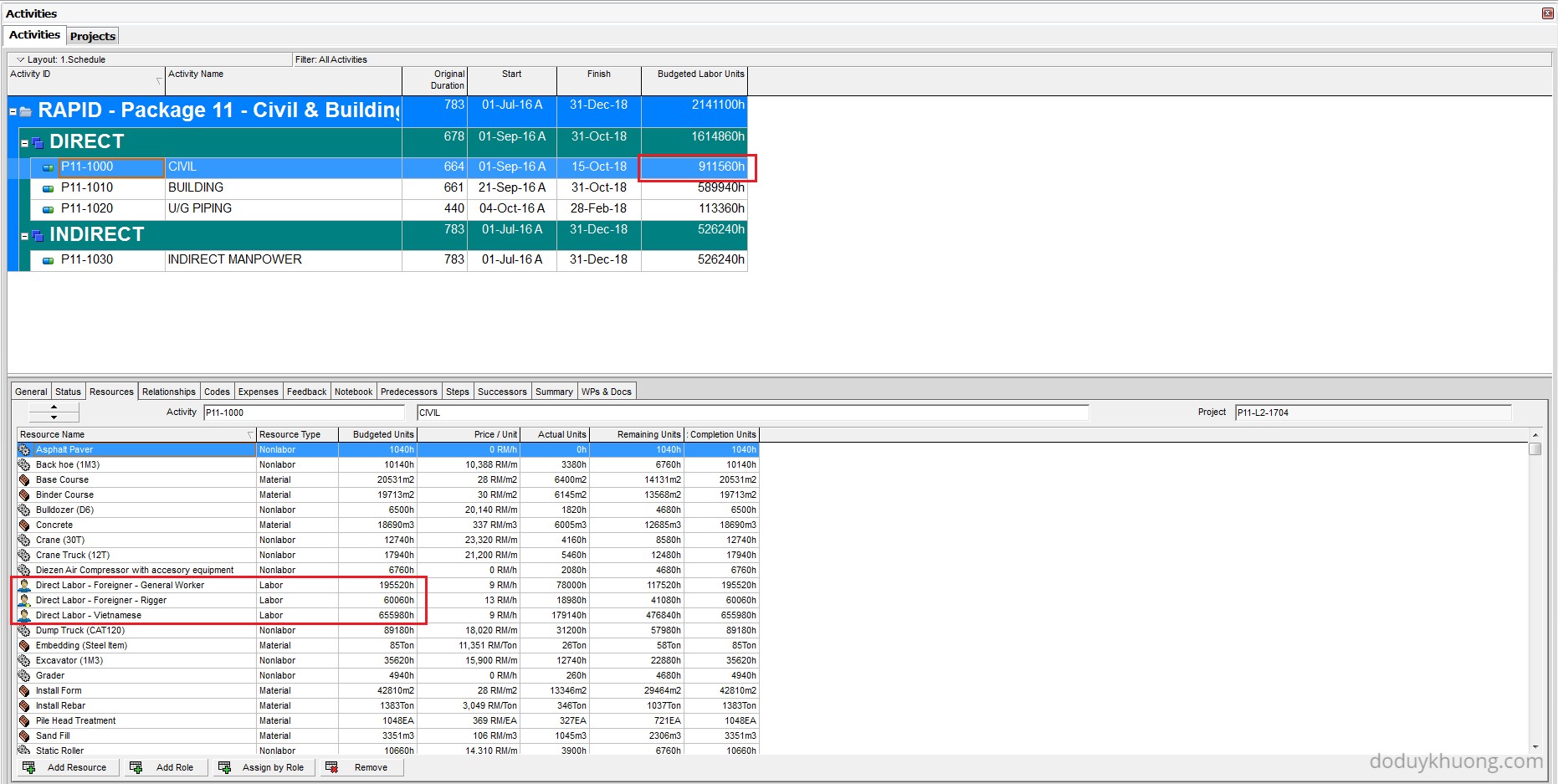
So, if you try to change the value of Total Budgeted Labor Units in Excel and import it back into P6, the software won’t know how to distribute that total across the individual resource assignments. As a result, the import will fail or the changes will be ignored.
Which Fields Can Be Imported?
Primavera P6 provides a list of fields that are importable via Excel. These are grouped by data type across several worksheets in the reference file:
Download : p6-importable_fields
The last worksheet, titled Default Columns, also highlights which fields are mandatory for a successful import/export.
Tips for Successful Import
- Always export from P6 first to get the correct Excel format.
- Ensure that all importable fields are in the correct format.
- If a field is listed as importable but fails to import, check if it has a leading apostrophe (‘) — this can sometimes interfere with data recognition.
- To update or replace an existing project via import, you must have the ‘Project Superuser’ security profile or be an ‘Admin Superuser’.

 Khuong Do Blog
S0 in Importing actual start/finish dates no need to change the activity status from not started to in progress or completed?
LikeLike
The inclusion of Actuals reports as Started and Completed. Start and Finish columns dates have an A after the date once Actual Start and Actual Finish columns are populated. Physical % Complete should be included in the columns of the spreadsheet and updated before Import for Started work.
LikeLiked by 1 person
i thought of a solution to import IDs for example.
how about importing it to a user defined field then use global change to copy it to IDs ? will that work?
LikeLike
Hi,
Yes it’s possible.
However you can use the Renumbering ID tool in P6. You can see instruction here https://doduykhuong.com/2016/05/27/renumbering-activity-id-in-primavera-p6/
LikeLike
So is there no way to update Resource and Role Rates? I work on a lot of government contracts and we have to update are rates at a minimum Yearly but can be as often as quarterly. Even using Generic Resources this is a very labor-some manual process. Is there any possible work around?
LikeLike
I could make an application to do that job, reply me if you interesting in it.
LikeLike
If I’m adding new activities to an existing project by importing (properly formatted) data from an Excel spreadsheet, is it not possible to set the planned start date for the activity through the spreadsheet? I face an issue where the new entries are successfully added into P6 but the planned start/end date for each activity automatically resets itself to the current data date in P6 – overwriting the date written in the Excel spreadsheet.
LikeLike
Hi there,
Usually Planned start/finish date is created by activity relationship, not by import from excel.
When you run F9, P6 will base on relationship to recalculate all the start/finish date.
LikeLike
typical oracle “i don’t care what you want reasoning”….. users groups have fought this for decades with no respoinse … why can’t someone just fix the blasted thing to do what is needed in P6 rather than a lot of fooling with workarounds … sheesh !
LikeLike
Hello, I am trying to automate the progress process through an import, I have tried to import the Resource Assignment screen worksheet since the activities have several resources assigned. The problem is when I put a date in the Actual Start column and I import it fills all the resources. If there is any solution for this it would be a great help.
In the other hand thanks for sharing knowledge with all of us.
E. Batista
LikeLike