

Problem
When attempting to change the Remaining Duration of an activity, the value reverts to its original state.

Causes & Solutions
1. Expected Finish Constraint
If the activity has an Expected Finish constraint, the Remaining Duration is automatically calculated as the time between the Data Date and the Expected Finish date. This prevents manual updates to the Remaining Duration.
Solution:
Remove the Expected Finish constraint to enable manual editing of the Remaining Duration.

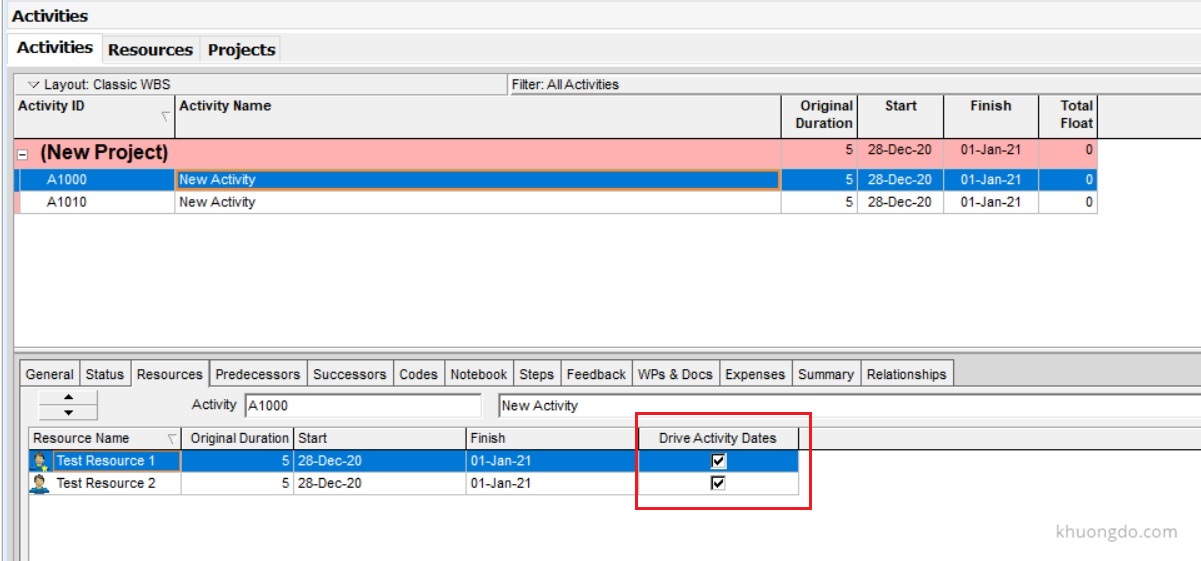
2. Driving Resource Assignment
If a driving resource is assigned to the activity, the Remaining Duration is driven by the resource’s duration or actual usage.
Solution:
Uncheck the “Drive Activity Dates” option in the resource assignment settings. This will allow manual updates to the Remaining Duration.

 Khuong Do Blog
Leave a comment