
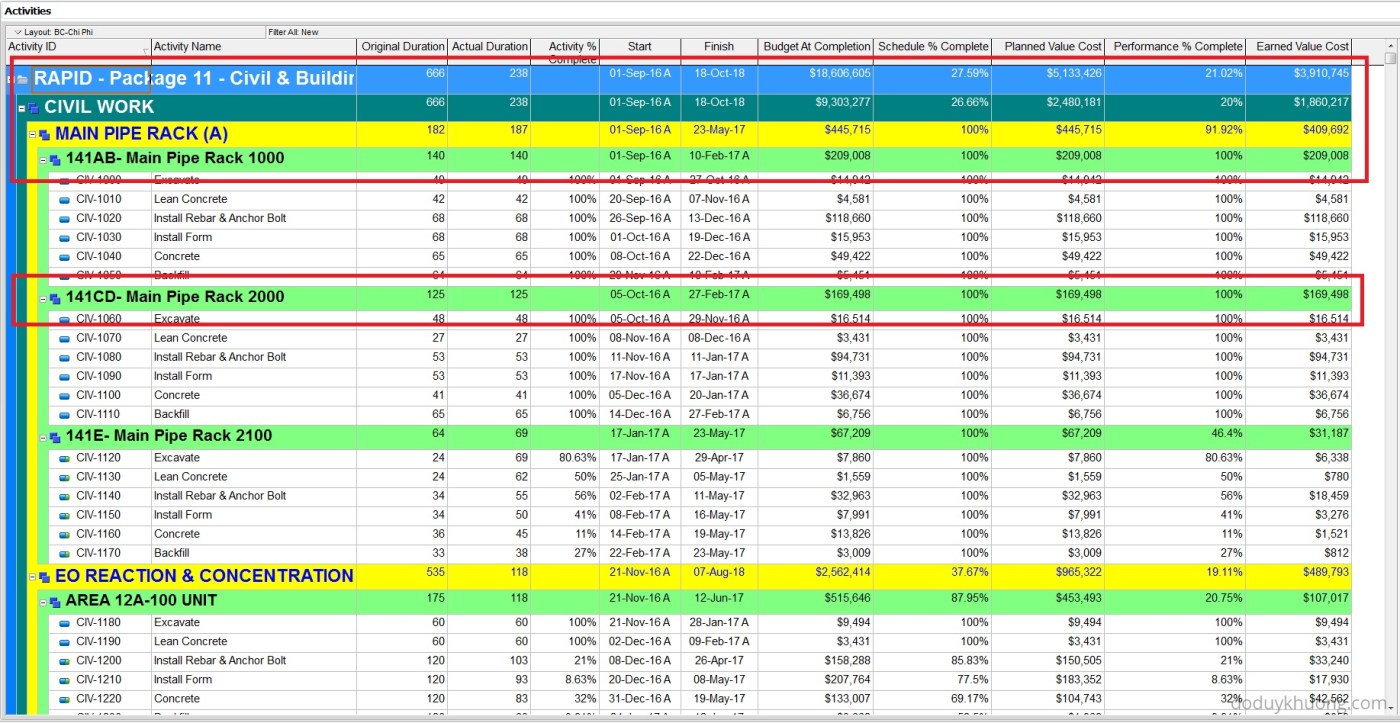
When working with layouts in Primavera P6, it’s important to understand how the software calculates and displays summary information for various data types such as costs, quantities, dates, durations, float, progress, and user-defined fields (UDFs). This article explains how these summaries are derived and what factors influence them.
All summary calculations in P6 are based on the currently visible activities in the layout. If activities are hidden due to filters, they are excluded from the summary calculations.
💰 Costs and Quantities
- Summary values for fields like Budgeted Cost and Budgeted Quantity are calculated by summing the values of all visible activities.
📅 Dates
- Start: Earliest Start Date. Calculated on the fly as the early start unless there is an actual. Then the actual is used.
- Finish: Latest Finish Date. Calculated on the fly as the early finish unless there is an actual. Then the actual is used.
🧩 User Defined Fields (UDFs)
- Date UDFs: Summarized using the earliest start or latest finish.
- Numeric UDFs: Summed across all visible activities.
- Text UDFs: Not summarized—they remain blank.
⏳ Durations
- Original and Remaining Durations:
- For activities without progress:
- Original Duration = Earliest Start → Latest Finish
- Remaining Duration = Earliest Remaining Start → Latest Remaining Finish
- For activities with actual start:
- Original Duration = Actual Start → Latest Finish
- Remaining Duration = Earliest Remaining Start → Latest Remaining Finish
- For activities 100% complete:
- Original Duration = Actual Start → Actual Finish
- Remaining Duration = 0
- For activities without progress:
Calendar Considerations
-
P6 Version 7.0 and later:
- If all activities use the same calendar, that calendar is used.
- If activities use different calendars, the Project Default Calendar is used.
- In multi-project layouts with different default calendars, the Global Default Calendar is used.
-
P6 Version 6.2.1 and earlier:
- Summary duration is calculated using the Global Default Calendar, based on the time span from the earliest start to the latest finish.
Actual Duration
When displaying the actual duration, it is calculated as follows:
- If no actual finish:
- Actual Duration = Data Date – Earliest Actual Start
- If all activities have actual finish:
- Actual Duration = Latest Actual Finish – Earliest Actual Start
📉 Float
- Controlled via Advanced Scheduling Options:
- Base float on Start dates: Earliest Late Start – Earliest Early Start
- Base float on Finish dates: Latest Late Finish – Latest Early Finish
- Most Critical: Lowest float value among all activities in the group
In P6 6.2.1 and earlier, float is calculated using the Global Default Calendar.
📊 Progress (% Complete)
Duration % Complete = 
Activity Percent (%) Completes: These do not roll up to summary level bands
For more detail kindly refer to following file:
Download : Primavera P6 Column_Summaries

 Khuong Do Blog
Hi,
Good article.
Just s small remark: Summary OD is calculated from the Planned St and Planned Fn.
Cheers
Baris
LikeLike
Nice to share. Just a quick one. Even though the default global calendar is 7 working days, the summary level duration does not follow this. I have different calendars for different activities. Any tips. Thanks in advance.
LikeLike
Hi Krishnan,
In a single project, if activities under a particular grouping are using a different calendar, the summary band will calculate duration based on the Project Default Calendar (set under Enterprise, Projects, Defaults tab.)
Not Default global calendar.
So you can check your Project default calendar to make sure you select the one that you want.
LikeLike
Dear Khuong Do,
Thank you for your article and good presentation but I think you have missed something important regarding the calculation of the summary original duration.
My search shows that the summary original duration is calculated based on the Planned Dates not the Start and Finish or Actual Start and Finish date. for more information please refer to my article on the following link.
http://www.planningplanet.com/blog/calculations-summary-original-durations-oracle%C2%AE-primavera-p6%E2%84%A2
LikeLiked by 1 person
Dear Yaser,
Thank you for your sharing.
Yes I will keep it in my mind.
So far I still see there is not any wrong situation occur by following my calculation method.
But if something weird happen, I will use your method.
Regards
Khuong
LikeLike
The matter is not your or my calculations, the matter is how the software calculate the summary original duration, i think you have test this by a trial schedule.
LikeLike
Dear Khuong Do,
Can you please let me know whether this Column Summary Calculation is extracted from Primavera P6 programme or it is made by you. Thank you.
Regards
Imran
LikeLike
Hi. It’s from Primavera document. It’s not made by me 🙂
LikeLiked by 1 person
Dear Khuong Do,
Thanks for your instant reply. Ok, but where can I find the full documents? If it is extracted from P6 software, can you please let me know the way how it has been extracted?
Regards,
Imran
LikeLike
Hi.
It’s from Oracle support knowledge website.
If you buy Primavera license, you can access to this website.
LikeLiked by 1 person
Okay. In our company we are using Primavera licensed version. Can you please share the website. Thanks once again.
High regards
LikeLike
It’s support.oracle.com
LikeLiked by 1 person
Great. Thank you. I see your blog to be very useful and very informative. Please if you don’t mind can you share your email id on my personal email. “i.ansari180@gmail.com” for any queries related to P6. 🙂
Thnks,
Imran
LikeLiked by 1 person
Hi.
Thanks. I’m very happy when you enjoy it.
You can connect with me through my linkedin profile showing at top of my blog.
Regards
LikeLiked by 1 person
Surely, thank-you and hope you’ll post more and more interesting posts regarding Project Management. 🙂 🙂
Regards
LikeLiked by 1 person