

When scheduling in Primavera P6, you may start with an 8-hour/day calendar. If you later switch to a 10-hour/day calendar, you’ll notice that activity durations and the project completion date change. For example, a 10-day activity becomes 8 days because the total hours remain the same, but the daily work hours increase.
So how can you change the calendar from 8 to 10 hours/day without changing the activity durations?


Step-by-Step Guide
1. Open Global Change
Go to: Tools → Global Change
Click New to create a new global change rule.

2. Create the Rule
Set up the rule to adjust the activity duration like the following picture:

3. Preview and Apply
Click Change to preview the results. Primavera will show you how the durations will be updated.
If everything looks correct, click Commit Change.
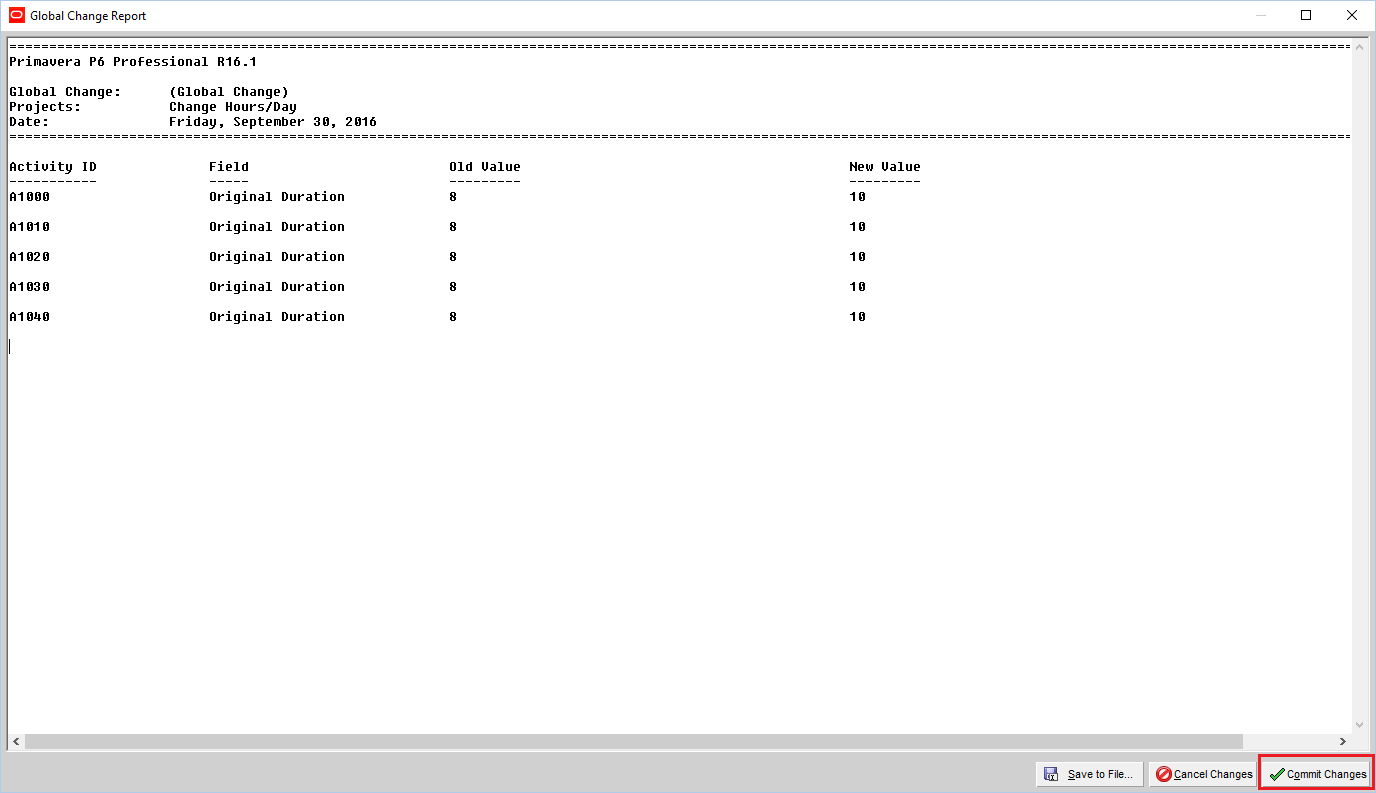
4. Verify the Result
After applying the change, you’ll see:
- Activity durations are restored to their original values (e.g., back to 10 days).
- The project completion date remains unchanged.
- The calendar now reflects 10 hours/day.


 Khuong Do Blog
Thanks, It’s great.
But if we change calendar form 6 days to 7 days. The project finish will change also. Is there any way to keep project finish as it is?
LikeLike
Changing from 6 days to 7 days, I think we don’t know what is the ratio between new value and old value. It’s not a constant number.
Only when changing hour, we know the ratio. For example, from 8 hours to 10 hours, the ratio is always 1.25
LikeLike
I think in this before but I thought you might have something. You are right there is no ratio for this.
Thanks again.
LikeLike
Store in UserDefined field. Divide /6 the O.D.. Then to bring back to original values Multiply the UserDefinedfield x7.. You have to use the Global change twice, because 6/7 is irrational number. Important thing here is you just have first to store the O.D. in UserDefined Field, then when you change to any calendar you have to multiply it based on the hrs/da of that calendar.
LikeLike
Hi,
Moahmed want to change from 6 days to 7 days per week. Not changing hours/day.
LikeLike
The changing of working days does not affect duration length, only the changing of working hours affects length of duration.
LikeLike
Hi,
If your activity last more than 1 week, then it’s affected.
LikeLike
Same aduration for each activity, the non-working day is not counted which P6 will just skip it. Number of working days remain the same. The Project Calendar Days wills become longer, but the individual activity working number of days remain the same.
LikeLike
Hi,
Oh yes you’re right.
Sorry I forgot to mention that Mohamed want the Project Finish date not change. Not the activity duration.
LikeLike
Hello Dodu,
Can you please add me on your whatsapp my no – 00971502645833 .
Toufiq
LikeLike
Hi there,
Thanks for your “Add friend” invitation. Kindly connect with me through my Page at https://www.facebook.com/doduykhuongblog/
Do Duy Khuong Blog
Primavera P6, Microsoft Project Tips & Tricks
See you there
LikeLike
Thank mate. I have few doubts
LikeLike
Dear sir,
I wish your help on my three doubts in the calender
if i change calender’s of resources in already assigned calendar whether it will reflect in the activity?
2.i have to use three calender , 7 days /8hr . 6 day/8hr, 6 day /10hr, 5 day / 8hr calender . When i am using it my float showing decimal. how i can avoid it.
as explaned i have to use three calender in project. but for all the activity i have to use common resources cash flow . which calender i have to use. Wishing your suggestion.
Thank you
Irshad
LikeLike
how to store Original duration in the user-defined column
LikeLike