

When scheduling a project in Primavera P6, you might notice that the Original Duration of an activity changes unexpectedly. This often happens when the Expected Finish Date is being used.
What Is the Expected Finish Date?
The Expected Finish Date acts like a constraint in Primavera P6—but only if the scheduling option “Use Expected Finish Dates” is enabled in your project settings.

This feature is particularly useful when you know when an activity should end, but don’t know the exact duration it will take to complete.
Once an Expected Finish Date is set, Primavera P6 will automatically recalculate the Remaining Duration each time the project is scheduled and the Data Date is moved forward. This ensures the activity still finishes on the specified date, even if progress is delayed.
Example Scenario
Imagine a simple project with two activities: A and B.
- Activity B is tied to a critical milestone and must finish on June 8.
- You set the Expected Finish Date for Activity B to 08-Jun.

Now, if Activity A is delayed, and you update the project:
- Activity B’s finish date remains fixed at 08-Jun.
- Its duration is automatically reduced to reflect the delay—say, from 5 days to 3 days.
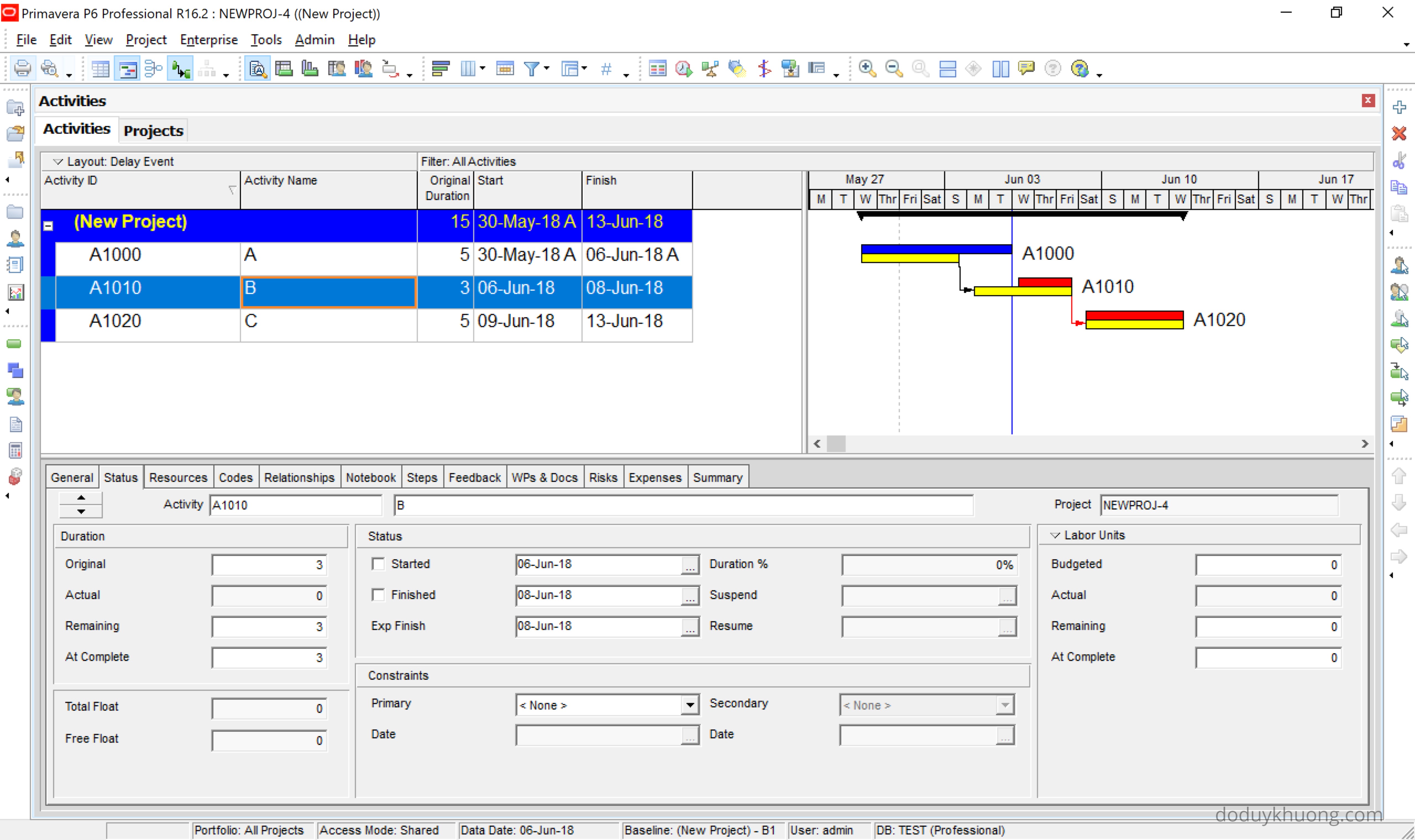
This effectively “locks” the finish date of Activity B without using a hard constraint.
Use Case: Long-Lead Items
Expected Finish Dates are also helpful when updating progress on long-lead items—such as equipment fabrication or delivery tasks that span several months.
Instead of manually adjusting the Remaining Duration during each update cycle, you can:
- Set an Expected Finish Date.
- Let Primavera P6 handle the duration recalculations automatically.
This streamlines the update process and reduces manual effort.
Further Reading
For a detailed walkthrough on using Expected Finish Dates during progress updates, check out this helpful guide:
https://www.planacademy.com/expected-finish-in-primavera-p6-speedy-updates/


But I don’t see it while working, the remaining duration remains same while checking the expected finish date option.
LikeLike
hi my friend if you make video it will be very usefull and easy understand. by the way i love your blog very instructive
LikeLiked by 1 person
Thank you
LikeLike
I have always had trouble formatting “new data” for re-import into Primavera from excel. In particular the expected finish date does not pull in most commonly. I have ASAP utilities to put a ” ‘ ” in front of text so P6 reads it as text but still does not work. It seems easier to change data and re-import than get new data. Any tips on this issue? johnreev44@comcast.net
LikeLike